In this step you will create a style sheet to control the background color for odd and even rows in a list. To do this you first need to understand how the background color is controlled at the moment.
- Execute WAM iiiUsingCSS in the browser and run IE Developer Tools (F12).
- Select the "Select" tool by clicking on the
 on the toolbar.
 - Click anywhere on a list row.
- Using the HTML view, select a TD tag, and scroll down the Style view to find the CSS that controls the background.
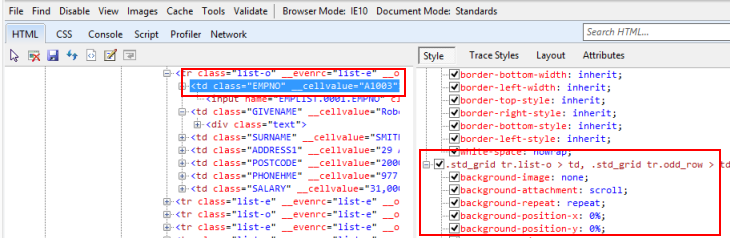
The CSS selector .std_grid TR.list-o > TD applies to all TD tags within an odd row, in a list, which is a table with a class of std_grid. The CSS is structured this way, due to the need for cross browser compatibility.
- Select the "Select" tool by clicking on the
- In Notepad use File/New to start a new document and add the following code.
.std_grid tr.list-o > td
{
     background-color: #fffacd;
}
.std_grid tr.list-e > td
{
     background-color: #ffe4b5;
} - Save your style sheet as iii_style.css, where iii are your initials. Use Save as Type: All Files to save the file with the css extension.
Make sure you save it to:C:\Program Files\LANSA\WebServer\Images\style.
Leave Notepad open.