Web development and operation can be done with a single-tier setup or a multi-tier configuration as described here.
To develop Web applications, you will need:
- A Data/Application Server, which can be a Windows or an IBM i server. The Data/Application Server is where your LANSA Repository resides and where the LANSA application runs.
- A Web Server, which can be a Windows or an IBM i server. The Web Server can be the same IBM i as your Data/Application Server, i.e. you can use single IBM i for both the Web Server and Data/Application Server.
- A Windows PC connected to the IBM i server to run the Web Administrator.
- A Windows PC with a supported browser to test your applications.
Your application development environment may be different from your intended deployment configuration.
A typical multi-tier Windows-based development environment might appear as follows:
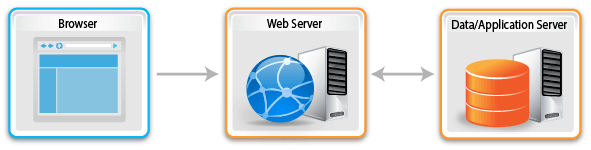
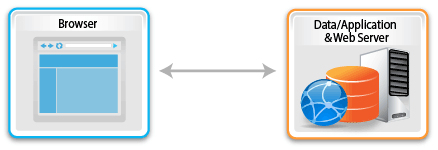
If you are running a single-tier, Windows-based development environment where both the Web Server and the Data/Application Server are installed on a single PC your configuration will be similar to the picture following. This type of installation is the standard, automatic installation, provided by the LANSA Installation.
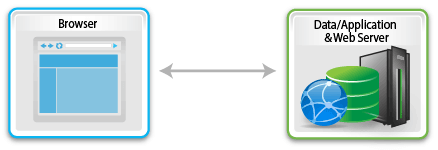
A typical Single-tier IBM i-based development environment might appear as follows:
Considerations for Web Development Environments
Following are some considerations for using the Web with your LANSA development environment:
- LANSA supports the concept of logical partitions to separate the different environments in your LANSA system. For example, you might have partitions for development (DEV), testing (TST), training (TRN), production (PRD), etc.
- You do not have to use the Web in all of your LANSA partitions.
- A Web application developed in a partition executes independently of applications in other partitions. The application partition is identified when the user executes the Web application.
- You must have both Visual LANSA and Web development licenses on the Data/Application Server in order to develop Web applications on Windows. Contact your local LANSA vendor for the licenses you will require.