These options allow you to specify certain options associated with the translation of data from the IBM i to the workstation.
The CCSID is fundamental to the proper operation of LANSA when connected to an IBM i system.
If you are installing an independent LANSA system and if you have any intention in the future of importing from an IBM i or using the "Deliver To" feature to an IBM i, then make sure that you choose the correct CCSID (Coded Character Set Identifier) information.
Once you have created objects in the Repository, do not change any information on this dialog.
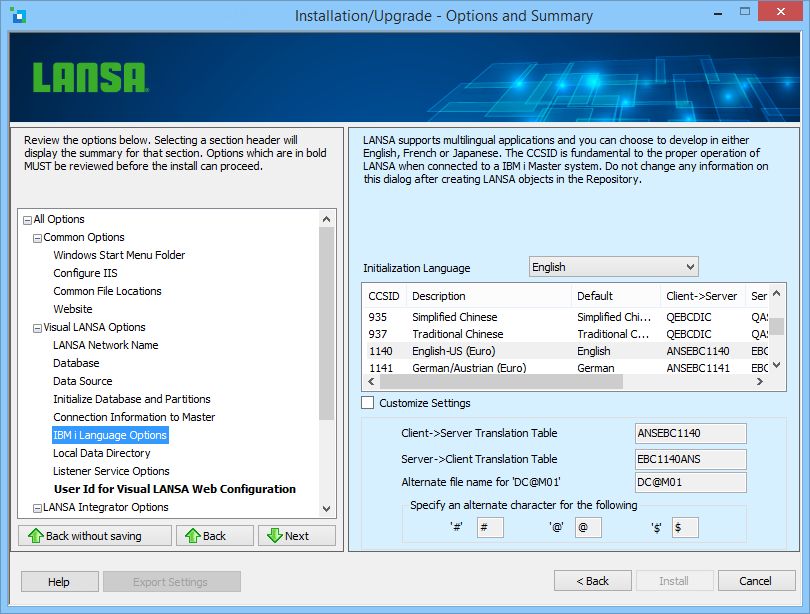
Initialization Language
Select the language you will use on your PC from the drop-down list.
CCSID Selection
Defaults have been provided for certain languages. These defaults should provide the best option for translating data between the IBM i and the workstation. There should be no need to use custom settings unless you have specific instructions from your product vendor or system administrator. CCSID 1140 will be the default for languages that do not have a specific default.
CCSID 1140 supports the entire Windows 1252 character set except for the following characters:
| Characters | Hex Range | Explanation |
|---|---|---|
| 'ƒ"...†‡ˆ‰Š‹OEŽ''""*--˜(tm)š›oežŸ | 0x82 to 0xA0 inclusive | These characters do not exist in the IBM i 1140 CCSID |
| ¤ | 0xA4 | The Euro replaces this character |
The full set of characters supported is:
€ !#$%&'()*+,-./0123456789:;<=>?@ABCDEFGHIJKLMNOPQRSTUVWXYZ
[\]^_`abcdefghijklmnopqrstuvwxyz{|}~¡¢£¥¦§¨©ª«¬®¯°±²³´µ¶·¸¹º»¼½¾¿
ÀÁÂÃÄÅÆÇÈÉÊËÌÍÎÏÐÑÒÓÔÕÖ×ØÙÚÛÜÝÞßàáâãäåæçèéêëìíîïðñòóôõö÷øùúûüýþÿ