Page History
General tab
This page allows you to record a system name and port identifier for a LANSA System on the IBM i.
| Note |
|---|
| Note: Multi-homing Support |
LANSA Web can be configured with multiple IP Addresses that point to one LANSA System.
It can be set up using IBM's HTTP Web Server products. To use LANSA Web with multi-homing support, you will need to specify the System Name and Port Number when creating a new LANSA system.
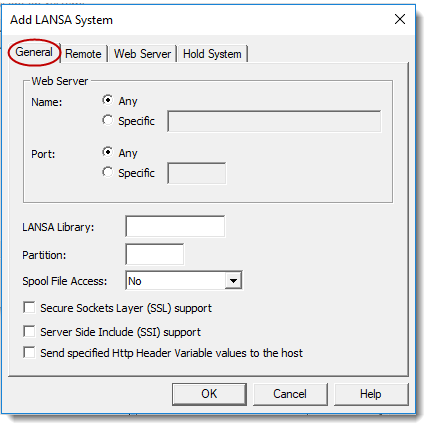
...
- No - Spool file access is not allowed for this system
- Default User - Spool file access is allowed and the user access will be as per the user profile associated with the default user. The default user will be the LANSA Web registered user of DFTPRT. If DFTPRT is not a LANSA Web registered user, DFTUSR will be used. The IBM i user profile associated with the default user will determine access rights to view spool file data. Refer to 1.4.2 User Registration for details of setting up default users.
- User Authentication - Spool file access is allowed and the user is required to provide authentication. This requires that the Web Server must be set up to require user authentication and that those users you wish to have access must be set up in the Web Server. The Web Server will not permit you to progress any further unless you provide a valid user profile. If a valid user profile is provided, the LANSA Web spool file features are available.
- When a user logs on to LANSA Web, it determines if the Web Server user profile is a registered LANSA Web user. If the user is known to LANSA Web, the associated IBM i user profile is used to determine access rights to spool file data. If the Web Server user profile is not registered with LANSA Web, the access to spool file data will be determined in the same way as for Default User access.
...
The default LANSA library is the LANSA system assigned to port 80. This is the default port identifier for the HTTP protocol.
If you have SSL support enabled, remember that the default port for SSL is 443.
...