Page History
When you select the Add or Change button on the Maintain Systems dialog box, the Add or Change LANSA System (as appropriate) is displayed. Add or change the Data/Application Server options as required.
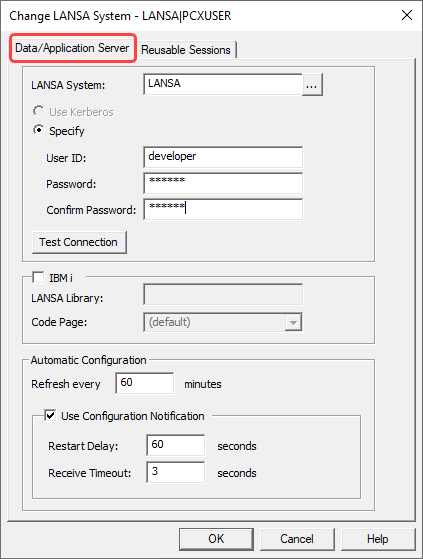
LANSA System
Enter the name of the host that is acting as your Data/Application Server. This name must be known to the LANSA Communications Extensions. You must not leave this parameter blank.
...
Specify a user profile and its password. A user profile is required to allocate a communications conversation between the Web Server and the Data/Application Server. Confirm password must match the password.
| Note |
|---|
| Note: The user profile specified must exist on the Data/Application Server and must have sufficient authority. If the Data/Application Server uses a trusted connection to connect the database, the user profile (by default it is usually PCXUSER) must have sufficient authority to access the database. |
Test Connection
Use Test Connection to try to establish a communication connection with the Data/Application Server with the user profile and system specified.
...
- For a deployment with a Windows host, leave this field blank.
- For a deployment with an IBM i host, enter the name of the relevant EBCDIC translation table shipped.
...