Page History
When you select the Add or Change button on the Maintain Websites (local) dialog box, the Add or Change Website <as requested> window is displayed. Add or change the Web Server options as required. Add or change option on the Advanced tab as required.
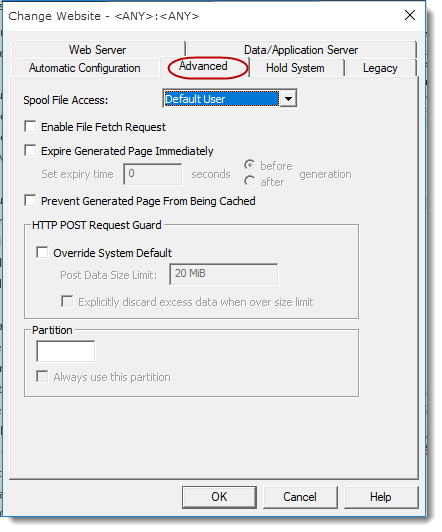
Spool File Access
Select an entry from the drop down list to set the level of user access to view IBM i Spool files via LANSA Web. This setting will only be relevant if you connect to an IBM i Data/Application Server and retrieve HTML.
...
If enabled, the following additional text will be added to the HTTP header of every web response produced by the LANSA Web Server Extension: Expires Expires: {time}
The expire time can be set to either the time when the web response is generated by the Data/Application Server or specified seconds before/after the generation time.
...
If enabled, the following additional text will be added to HTTP header of every web response produced by the LANSA Web Server Extension: Pragma Pragma: no-cache
See W3C protocols: 14.32 Pragma for more information.
By default, this option is not enabled.
HTTP POST Request Guard
You can either use the settings defined at the Web Server level or you can override those settings for this
LANSA System. See Post Data Size Limit in in General (LANSA Web Server Extension) for information.
Partition
...