Page History
The Visual LANSA Logon is displayed when the Visual LANSA Development Environment is started.
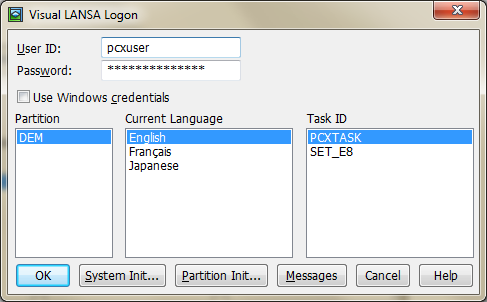
You must specify the following:
- 3.3.1 User ID
- 3.3.2 Password
- 3.3.3 Use Windows Credentials
- 3.3.4 Partition
- 3.3.5 Current Language
- 3.3.6 Task ID
Perform a 4.3 System Initialization whenever new details are to be updated on the PC. For a new Visual LANSA system, the System Initialisation Initialization automatically appears at the end of the installation process.
If you are using a new partition defined on a Master System, 4.4 Partition Initialization will automatically appear.
| Info |
|---|
| You must enter a User ID and Password before the 4.4 Partition Initialization option will be enabled. |