Page History
...
Component Properties
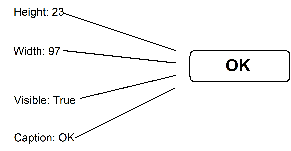
All Visual LANSA components have properties which define their characteristics. Most properties deal with the way a component is displayed on the screen: its size, color, and whether it is visible or not. You can set the properties when you are designing your application, or programmatically when the application is running. Often you do not need to change any of the default property values.
Component Events
Traditional LANSA functions (Universal UI) implement procedural programming method, Visual LANSA applications are event-driven.
The main difference in writing Visual LANSA applications compared to traditional LANSA functions is that in Visual LANSA the code belongs to the various controls on the form instead of a single function. This code is run when the user performs an action on the control, for example clicks a button. This is called event-driven programming.
An event is a thing that happens or takes place. Typically an event is any action the user takes. The most common event is click (when the user clicks on a component with the mouse). You could for example define a button 'Print' and write code for the button's click event to print something. When the application is running, every time your user clicks on the Print button the print routine will be executed.
Other common events are:
- Initialize. This event is triggered when a component is first displayed.
- GotFocus and LostFocus. This event is triggered when the user selects a component with the mouse.
- Change. This event happens when the user changes the contents of component, for example a field.
...