Page History
In the initial step of this tutorial you created a specific association between your 5250 field and the special field handler DF_PRM04 like this:
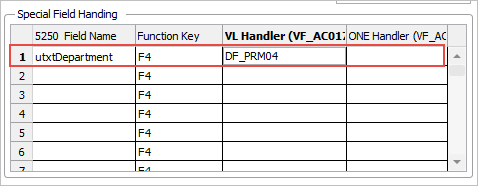
This means that on any 5250 screen containing a field with this name the handler DF_PRM04 is called.
So by using a naming convention you can instantly add prompting to any 5250 screens that have a field with this name on them.
This type of specific association is most useful on key fields (like CustomerNumber, ProductNumber, etc) and code fields (like StateCode, CurrencyCode, etc). For key fields you can often associate a handler that allows the user to search in many different ways to locate a customer or product. For code fields you can often display the code/decode table allowing the user to select the code they want to use.
You can also create generic associations: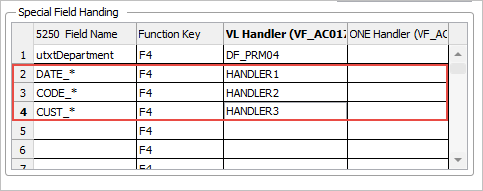
Here:
- Fields starting with the name DATE_ will cause HANDLER1 to be invoked when F4 is used.
- Fields starting with the name CODE_ will cause HANDLER2 to be invoked when F4 is used.
- Fields starting with the name CUST_ will cause HANDLER3 to be invoked when F4 is used.
...