Page History
Unlike an array, a keyed collection does not have to be keyed by an index. This example is otherwise the same as Example 1 except that the collection of employees is keyed by the #Surname field instead of a number.
When you type in an employee name and click on the Save button, the employee name is saved in a collection.
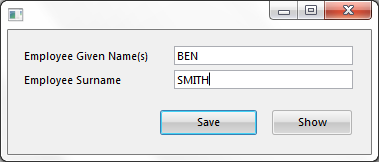
When you click on the Show button, all employees entered in the collection are displayed in a message box.
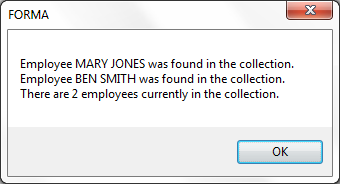
The collection is uniquely keyed by #SurName so a duplicate name will update the existing item in the collection.
Define the Collection
The collection to store employee names is defined like this:
Define_Com Class(#Prim_kCol<#GiveName #SurName>) Name(#Employee)
...
Example 2: Collections do not Need to Be Keyed by Index
Add Items to the Collection

The code to save the employee's full name into the keyed collection is contained in the Click event of the Save button:
Set Com(#Employee<#SurName>) Value(#GiveName)
In the above note that there is no need to compute the next available key for the collection item as in Example 1 because the collection is keyed by the #Surname field.
Example 2: Collections do not Need to Be Keyed by Index
Work with the Collection Items

Individual items in the collection are accessed using a For/EndFor loop.
The click event of the Show button iterates through the collection referencing each entry in the collection by using a For/EndFor loop to retrieve the value of #GiveName and #Surname of the individual employees to a message box:
For Each(#Employee_GiveName) In(#Employee) Key(#Employee_SurName)
Use Builtin(MESSAGE_BOX_ADD) With_Args('Employee' #EMPLOYEE_GIVENAME.VALUE #EMPLOYEE_SURNAME.VALUE 'was found in the collection.')
Endfor
In the above note that:
...