Page History
...
- You can put some tracing
#com_owner.avframeworkmanager.avRecordTrace Component(#com_owner) Event("Adding entry = " + #vf_eltxts + ", " + #skilcode + ", " + #skildesc + ", " + #grade)
Add_Entry To_List(#skills)
#listcount += 1
Endwhile
- when identifying this screen we set the name of the "+" sign = "moreindicator". The presence of that field in the last row of the subfile tells us whether there is another page. The last row is one less than the current value of #listcount.
#listcount -= 1
If (#myscreen_wrapper.check_field_exists( "moreindicator" #listcount ))
#myscreen_wrapper.getvalue From("moreindicator") Value(#MoreVal) Index(#listcount)
#NextPage := (#MoreVal.trim *NE "")
Endif
Endroutine
This code traverses the skills subfile by first checking if the first column corresponding to the DATEACQ field exists. If it is present on the screen, the routine gets the values for all the subfile columns.
Fields in RAMP-TS subfiles are indexed starting from 1. A subfile page with 7 rows will have 7 instances of each of the fields in the subfile. Here we increase #listcount and use it to get the value of a field.
Note that you can specify a default value when using the getvalue method.
The moreindicator is the name you gave to the plus sign on the screen.
4. Now locate the #myscreen_wrapper.vHandleArrive event routine.
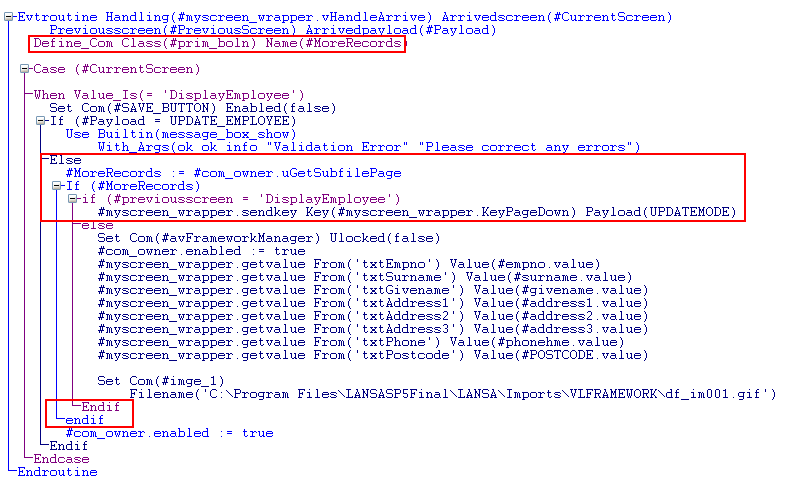
5. Define a Boolean class #MoreRecords which will be used by the wrapper to determine if there are more records in the skills subfile.
Define_Com Class(#prim_boln) Name(#MoreRecords)
6. Then add this code to check value returned by the uGetSubfilePage method, and if there are more records, to send a PageDown keystroke to get to the next subfile page.
#MoreRecords := #com_owner.uGetSubfilePage
If (#MoreRecords)
if (#previousscreen = 'DisplayEmployee')
#myscreen_wrapper.sendkey Key(#myscreen_wrapper.KeyPageDown)
(The check for the previous screen is there simply to slow the screen wrapper down so that repeated SENDKEY requests on fast machines get queued properly.)
Your code should look like this:
7. Compile the screen wrapper.
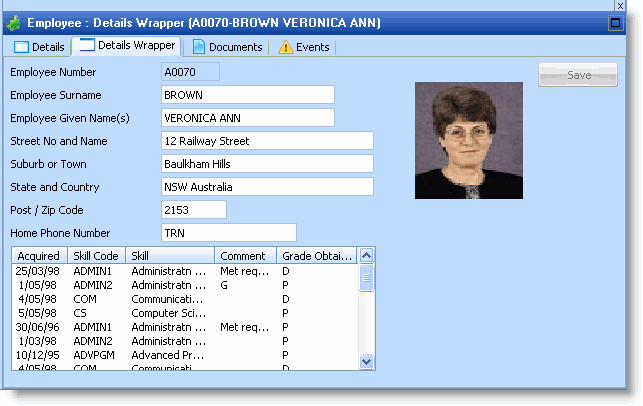
8. Start the Framework and display the Details Wrapper command handler for an employee.
...