Page History
...
The
...
tutorial RAMP-WIN007: Snapping in a Data Entry Function covers this topic in detail.
A filter manages its associated instance list. When a RAMP screen deletes, adds or changes business object instances, it needs to notify the filter that a change has occurred.
Create the Filter with Program Coding Assistant
To create a filter that listens for changes from RAMP screens use the Program Coding Assistant and select the option Routine to listen for changes and update the instance list:
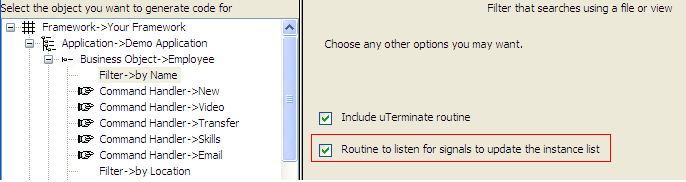
This option creates Filter Code which Automatically Handles Changes to Instance List.
Add AVSIGNALEVENT Function to the Button Script
Add an AVSIGNALEVENT Function in the button script of your RAMP destination screen for the button that handles the change (typically Save or Delete) to signal to the filter that the instance list needs to change.
For example, in a RAMP screen that updates an object, add this statement to its SAVE button script:
AVSIGNALEVENT("Update_List_Entry",
...
"BUSINESSOBJECT",
...
objListManager.AKey1
...
[0
...
]);
...
The
...
event
...
being
...
signaled
...
is
...
named
...
Update_List_Entry,
...
and
...
the
...
value
...
being
...
passed
...
is
...
the
...
identifier
...
of
...
the
...
instance
...
that
...
has
...
been
...
updated.
...
To
...
handle
...
the
...
saving
...
of
...
a
...
newly
...
created
...
object,
...
you
...
must
...
pass
...
to
...
the
...
filter
...
the
...
identifier
...
of
...
the
...
object.
...
For
...
example,
...
to
...
add
...
a
...
new
...
employee
...
with
...
employee
...
number,
...
you
...
would
...
first
...
capture
...
the
...
employee
...
number
...
on
...
the
...
screen
...
using
...
the GETVALUE Function and store it as a property of the objGlobal object, and then pass it to the filter:
objGlobal.utxtEmployeeCode = GETVALUE("utxtEmployeeCode");
...
SENDKEY(KeyEnter);
...
AVSIGNALEVENT("Add_List_Entry",
...
"BUSINESSOBJECT",
...
objGlobal.utxtEmployeeCode);
...
(The
...
utxtEmployeeCode
...
field
...
is
...
the
...
employee
...
number
...
field
...
that
...
has
...
been
...
defined
...
as
...
a
...
text
...
field
...
on
...
the
...
destination
...
screen.)
...
The
...
standard
...
event
...
names
...
you
...
can
...
use
...
to
...
update
...
the
...
instance
...
list
...
are:
- Refresh_Instance_List
- Update_List_Entry
- Add_List_Entry
- Delete_List_Entry.