Page History
...
- Level 1 expanding – add sections When (= '1') #deptment := #onsubid Select Fields(#deptment #section #secdesc) From_File(sectab) With_Key(#deptment) #listid := #deptment + #section #listcapt := #secdesc #listpid := #deptment #haschld := Y #selwam := iiiTRE_2 #selwrn := SECDET Add_Entry To_List(#emptree) Endselect
Level 2 expanding – add employees When (= '2') Get_Entry Number(1) From_List(#ancestor) #deptment := #listid #std_num := (#deptment.CurChars 1) Get_Entry Number(2) From_List(#ancestor) #section := #listid.substring( #std_num ) Clr_List Named(#emptree) Select Fields(#empno #surname #givename) From_File(pslmst1) With_Key(#deptment #section) #listid := #empno #listcapt := #surname ', ' #givename #listpid := #deptment #section #haschld := N #selwam := iiiTRE_2 #selwrn := EMPDET Add_Entry To_List(#emptree) Endselect Endcase Endroutine
2. Compile your WAM and open the deptview WebRoutine in the Design view. Select the tree view and complete setting up its properties, as follows:Property
Value
onexpand_wrname
TREEEXPAND
onsubmit_id_field
ONSUBID
onsubmit_level_field
ONSUBLVL
onsubmit_ancestor_list
ANCESTOR
|
3. Save your changes and execute your WAM in the browser. Click the Expand icon to test the expanding. (Clicking the text to display the details for this level, will be completed in the next step.)
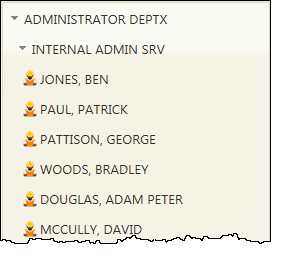
You should now be able to expand a department to add sections belonging to this department and then expand a section, adding employees belonging to this section.