Page History
WAM085 - Enhancing the User Interface
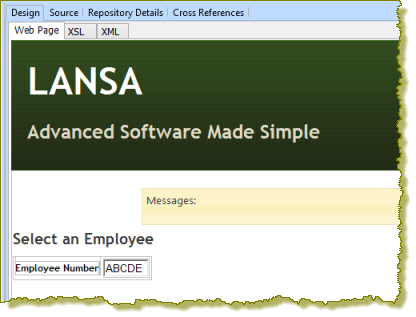
1. Open the select WebRoutine in the Design view. It should look like the following:
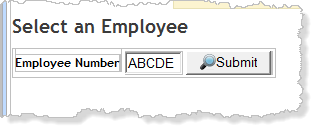
2. Add a column to the table containing employee number and drop a Push button with image weblet into the new cell. Delete the placeholder characters. Set up the push button as follows:
...
|
Your page should look like the following:
3. Drop an jQuery UI AutoComplete weblet onto the Employee Number field and set up its properties as follows:
...
|
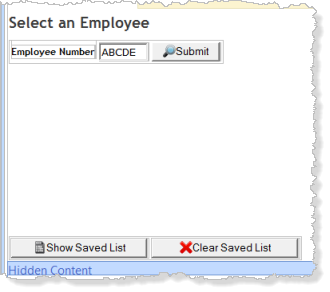
Your web page should look like the following:
6. Save your changes.
7. Open the ShowPage WebRoutine in the design view. Your web page should look like the following:
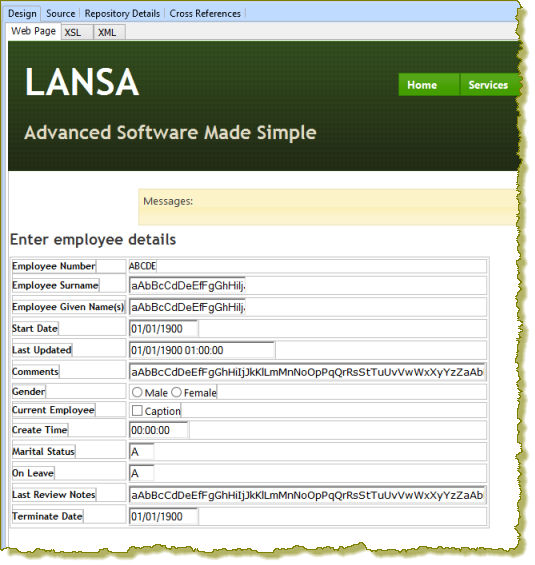
a. Note that Start Date, Last Updated, Comments, Gender, Current Employee and Create Time are all shown as weblets. For example click on the Start Date field and select the Details tab. Note that this is the std_datepicker weblet.
These weblets are all defined as weblet field visualizations in the Repository.
b. Select Last Review Notes and then Terminate Date and check their definition using the Details tab. Notice that they have also been defined in the web page as weblets (std_varchar and std_DatePicker respectively) based on their field type. These are fields you defined in the WAM.
c. The single character (Alphanumeric) fields Marital Status and On Leave are input fields. In the Design view you will replace these with weblets.
| Anchor | ||||
|---|---|---|---|---|
|
...
|
Note that the Comments field is now a memo box.
10. Select the Current Employee checkbox and change its caption to ''. The caption should now be blank.
Note that the oncode and offcode properties for the check box weblet are values of Y and N which are correct for this field. These values could be changed if necessary.
11. Drop a Radio Group weblet onto the field Marital Status. On the Details tab, in the items property's value column, use the Ellipsis button to open the Design of… dialog to define three captions and values as shown:
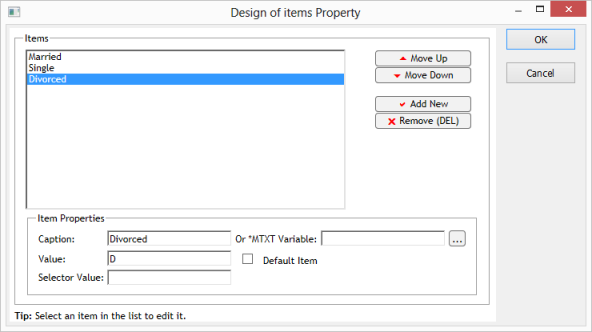
Caption | Value |
|---|---|
Married | M |
Single | S |
Divorced | D |
...