Page History
...
- when called from Begin WebRoutine
When = N
Change DEPTMENT to DEPT_IN (value passed in from iiiSecMaint)
Change SECTION to *null (value is passed in from iiiSecMaint) when Save button clicked
When = A
Change DEPTMENT to DEPT_IN (the input value on the web page)
Insert to Section file
If Status is *OKAY
Output message
Change STDRENTRY to L
Transfer to WebRoutine iiiSecMaint.Begin
Endif
Endcase
Your completed RDMLX code should look like the following:
Function Options(*DIRECT) Begin_Com Role(*EXTENDS #PRIM_WAM) Layoutweblet('iiilay01') Group_By Name(#SECT_DETL) Fields((#DEPTMENT *hidden) #SECTION #SECDESC #SECADDR1 #SECADDR2 #SECADDR3 #SECPCODE #SECPHBUS) Define Field(#dept_in) Reffld(#deptment) Web_Map For(*BOTH) Fields((#STDRENTRY *HIDDEN)) WebRoutine Name(ADDSECT) Desc('ADD SECTION') Web_Map For(*BOTH) Fields(#dept_in #SECT_DETL) Case Of_Field(#STDRENTRY) * New button clicked in iiiSecMaint When (= N) #deptment := #dept_in #SECTION := *NULL * Add button clicked When (= A) #deptment := #dept_in Insert Fields(#SECT_DETL) To_File(SECTAB) Val_Error(*NEXT) #STDRENTRY := *NULL If_Status Is(*OKAY) Message Msgtxt('Section successfully added') #stdrentry := L Transfer Toroutine(#iiiSecMaint.BEGIN) Endif Endcase Endroutine End_Com
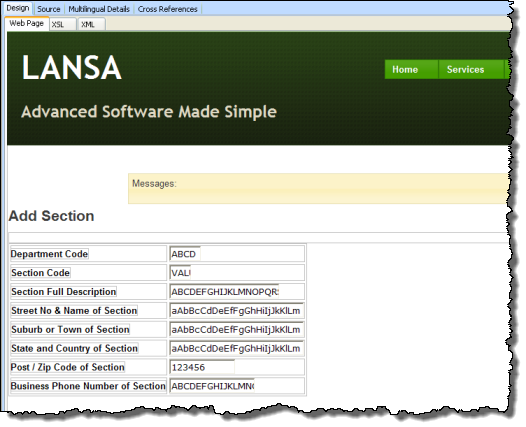
2. Compile your WAM and open in the Design view. It should look like the following:
3. If necessary change the Department Code to an input field. Drop an AutoComplete weblet onto the department field value. Set up the weblet properties based on:
Property
Value
sourceWamName
iiiSecMaint
sourcewrName
AutoComplete
listName
DEPTS
valueField
DEPTMENT
|
Note that the AutoComplete weblet is calling the response WebRoutine you created in WAM iiiSecMaint.
4. The Section field should be an input field, change it if necessary.
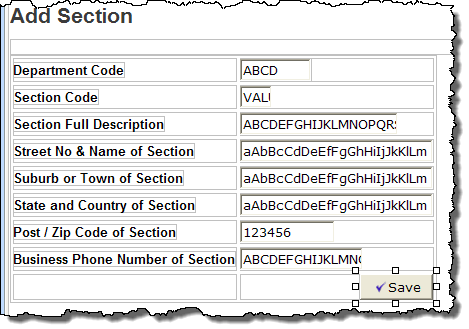
5. Add a row to the bottom of the table and add a push button with image to the right hand cell. Make the cell right align. Set up the push button properties as shown:Property
Value
caption
Save
left_relative_image
icons/normal/16/check_mark_16.png
on_click_wrname
AddSect
submitExtraFields
Field Name: STDRENTRY
Literal Value: A
|
6. Save these changes. Your completed AddSect page should look like the following: