Page History
...
|
5. This step adds a Message weblet to this page:
a. Select the tab pages weblet. Move the cursor right and press enter. This should create a blank space above the tab pages weblet.
b. Drag and drop a Messages weblet into the space immediately above the Tab Pages weblet. Your design should now look like the following:
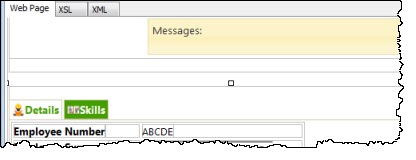
6. Select the Messages weblet and set its target_window_name property to _top. This will route messages from this page to the messages weblet on the page in which it is embedded.
Save your changes.
7. Retest your WAM. The update employee details logic has already been included in the Details WebRoutine. You should now be able to change employee data and save the changes. Try making an invalid change, such as a blank surname.
8. To handle update of employee skills the CASE loop in WebRoutine Details requires new logic.
...
|
12. Remove the * place holder characters from the right hand cell. Leave them in the left cell.
13. Click on the Details tab page to select it and then Save your changes.
14. Re-test your WAM. Note that on the Home ribbon, you can use History button in the Runtime gallery, to re-run any VL component.
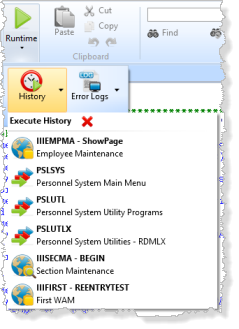
- You should be able to change any employee skills data and save changes with the Save button.
- Errors such as Date Acquired = zero or other validation errors will display messages in the messages weblet.
- After the Save button is processed the Details tab is redisplayed, because this is the default tab. You will fix this issue in a later enhancement.
...