Page History
To define how, for example, a label will be displayed, you set its VisualStyle property.
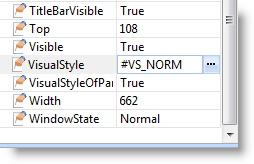
Let's say you use the shipped visual style VS_Norm. This style defines the following properties for the label:
BorderStyle | 3DLeft (3D effect, shadow on the left) |
NormBackColor | ButtonFace (the color specified for buttons in the Windows BUTTONFACE system value, usually gray) |
TextColor | WindowText (the color specified for windows text in the WINDOWTEXT system value, usually black) |
Face Name | MS Sans Serif |
FontSize | 8 points |
It will look like this: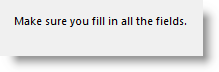
You could, for instance, change the VisualStyle of you label to VS_WARN. This style has different TextColor and Font properties:
TextColor: RedBold: True
If you used this style, your label would be displayed like this: 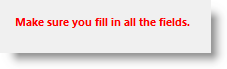
Further Information
The Scope of Visual Styles
Shipped Visual Styles
Set the Default Visual Style for New Forms
Create or Edit a Visual Style
Set Colors
Preview your Visual Style