Page History
You are going to use Tomcat 8.5 in this tutorial. For convenience, you can download Tomcat binaries ZIP file from LANSA's developer website. Included in this package is a sample Java class that shows how to make your Java code callable from your RDMLX code.
Download the ZIP file from here:
https://developer.lansa.com/files/java-interop-tutorial.zip
Extract the ZIP file to a folder on your IBM i's IFS, for example /home/tony/java-interop-tutorial.
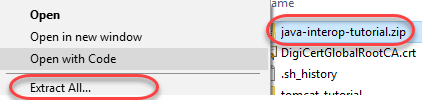
From Windows Explorer, right-click on java-interop-tutorial.zip, then choose Extract All….
Change the target folder to your IFS folder, and tick the Show extracted files when complete checkbox:
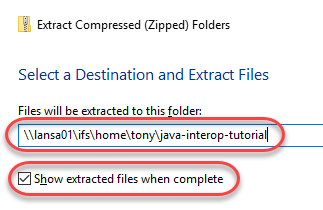
Press the Extract button. Access to IFS is often slow so the extraction process might take a few minutes. You should see a new Explorer Window with the extracted files afterwards.
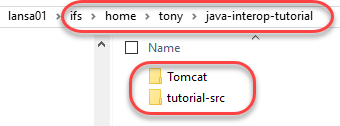
You should see two folders:
- Tomcat: this is the Tomcat binary and configuration files
- tutorial-src: this is our Java source files and deployment unit (required libraries and deployment descriptor).
Next: Configuring Tomcat