Page History
...
- Review function iiiFN04 in the Visual LANSA editor. The code generated by Studio, includes TRACE(*YES) on the SERVICE_LOAD command. Note that trace should be turned off in your production application, to avoid overheads.

- Run your application
- On the Project tab in Studio, open the server. Expand the trace (Trace Files) folder on the JSM Server panel.
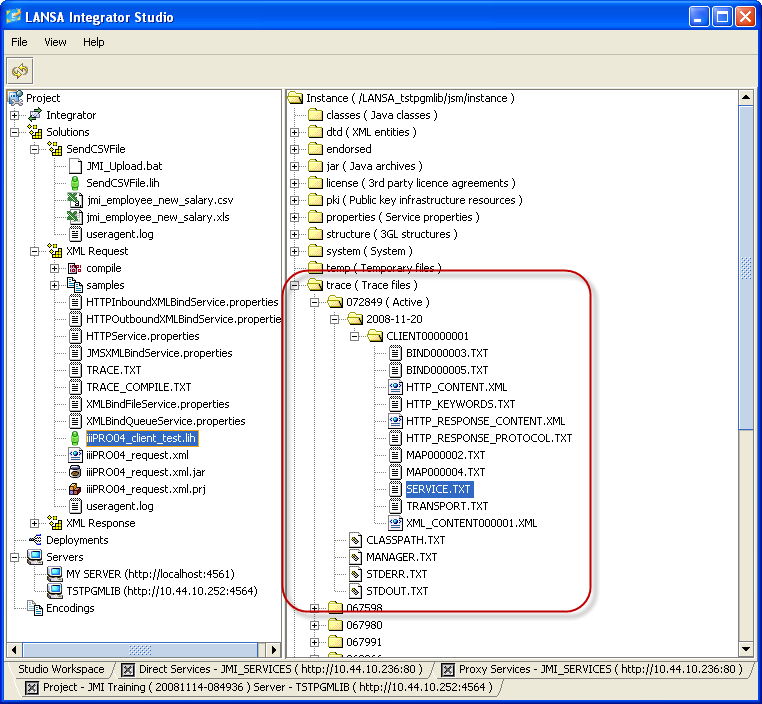
- Look for the active job number and open this folder.
Open the client folders and review the contents of the different trace files.
Note The Service and Transport trace files can be opened with a Trace Viewer. - To download the trace files, right click one of the client folders and select the Download option from the pop-up menu. All trace files will be placed into a zip file and a new Download tab will be shown in Integrator Studio. Select a file on the Download tab to save it. The downloaded file could now be emailed to another developer when troubleshooting a problem.