Page History
...
- 3.1 Specify the Host and Related Options
- 3.2 Choose the Language and Font
- 3.3 Set Query File Location
- 3.4 Default DateTime Result Format
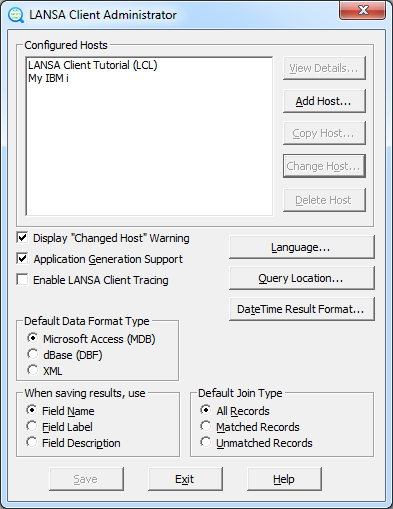
Configured Hosts
This box contains a list of the hosts configured for this environment. Initially it will be empty.
There must be at least one host, and there can be a maximum of 100 hosts defined for a single LANSA Client environment. When there are multiple hosts defined, the user chooses which host to connect to from a list displayed when LANSA Client starts.
To View the details of an existing host system:
- Select the host system from the Configured Hosts list.
- Select the View Details button. The Host Configuration Details dialog box is displayed with the host's details.
To Add a new host system:
- Select the Add Host button.
- The Host Configuration Details dialog box is displayed to allow you to enter details and choose options for the new host system.
To Copy an existing host system:
- Select the host system you want to duplicate from the Configured Hosts list
- Select the Copy Host button. The Host Configuration Details dialog box is displayed to let you change details as necessary.
To Change the details of an existing host system:
- Select the required host system from the Configured Hosts list.
- Select the Change Host button. The Host Configuration Details dialog box is displayed so that you can change the details, if necessary.
...