Page History
...
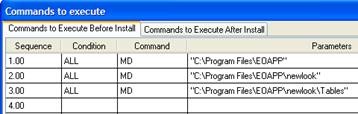
Instruct the package to create newlook directories | Instruct the deployment package to create the newlook directories specified above. To do so, we will execute the MD command (i.e. Make Directory) before the installation occurs. | Click the Command button on the Deployment Tool toolbar. ALL MD "C:\Program Files\Application Name" Note that you must first create any intermediate directories individually because the Deployment Tool will only create a directory when the intermediate directory exists. If you have added other directories in your newlook directory, you need to add a command to create those directories as well. |
...