Page History
The RAMP-TS session used in this example has a special fields handling table like this: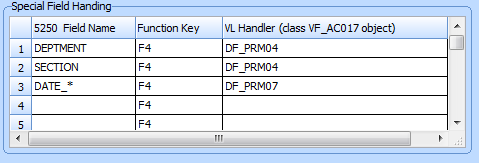
If you do not understand what this means you should complete the special field handling tutorial.
The special field handling table enables automatic prompting of these fields on the example screen like this: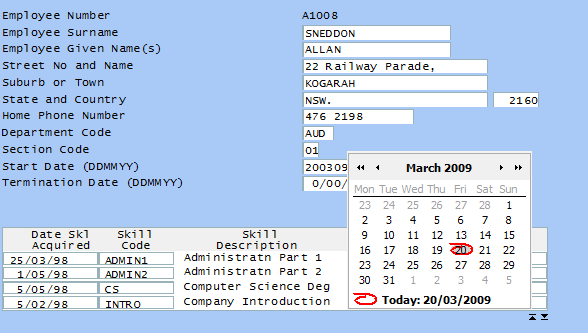
Here the user has pressed F4 when the cursor was positioned in the Start Date field. The special field handler DF_PRM07 causes a calendar to appear, allowing the user to select a date.
...
First, modify SHARED.ApplyStandardLayout to receive an optional parameter like this:
ApplyStandardLayout : function(aPromptFields)
Then add code like this example to the ApplyStandardLayout
/* Insert prompting images */
...
...
if (aPromptFields != null)
...
{
...
for (i = 0; i < aPromptFields.length; i++)
...
{
...
oH = HTMLAPI.getElementbyName(aPromptFields[i]);
...
if (oH != null)
...
{
...
oI = HTMLAPI.insertImage(oH,"/ts/skins/images/zoom_in_18x18.gif",this.HandlePromptImageClick,12,12,2,3);
...
oI.PromptFieldName = aPromptFields[i];
...
}
...
}
...
}
By checking aPromptFields == null you rdesign allows for the parameter to be optional. Callers do not need to pass it.
The SHARED object also needs to have a function added to handle clicking on the images created, like this example:
/* ------------------------------------------------- */ /* Handle clicking on a prompt image */ /* ------------------------------------------------- */
HandlePromptImageClick : function(oE) { var oI = oE.srcElement; if (typeof(oI.PromptFieldName) != "undefined") { SETCURSORTOFIELD(oI.PromptFieldName); EXECUTE_BUTTON_SCRIPT(KeyF4); } },
Finally, the example 5250 destination screen that is using SHARED.ApplyStandardLayout needs to be modified to pass an array of promptable fields.
First the array is declared like this (at the start of the scripting code):
aPromptFields : Array("DEPTMENT","SECTION","DATE_START_DDMMYY","DATE_END_DDMMYY"),
The call to SHARED.ApplyStandardLayout is modified
SHARED.ApplyStandardLayout(this.aPromptFields);
...
The resulting 5250 screen looks like this: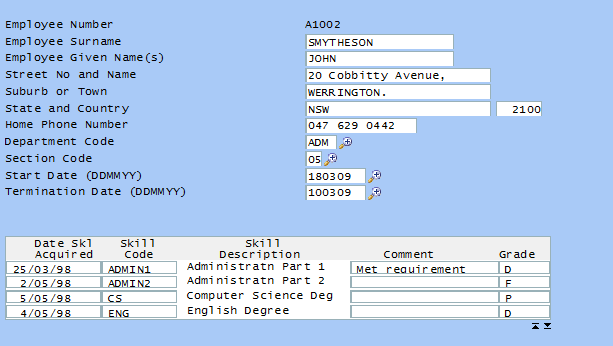
Note the small images now appearing beside the promptable fields.
...