Page History
The menu needs to be setup with WAM name and WebRoutine name for four WAMs. For the first four WAMs using the common layout, the information is as follows. Replace iii with your initials.
| Anchor | ||||
|---|---|---|---|---|
|
WAM Name | Identifier | WebRoutine Name | Menu Caption |
|---|---|---|---|
iiiEmpEnquiry | begin | Enquiry | |
iiiEmpUpdate | begin | Update | |
iiiEmpUpdate_MK2 | begin | Update with Dropdowns | |
iiiDynamSelector | begin | Update with Dropdown using Selector |
|
0. Before you continue with this exercise, display your WAMs on the Repository tab and note the Identifiers for these WAMs: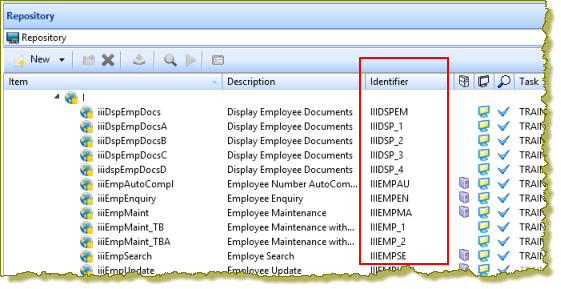
Visual
Visual LANSA allocates a unique 10 character Identifier to each component you create (if Long Names is enabled at partition level). When calling the WAM directly in a URL, the Identifier, not the long names must be used.
1. Open layout iiilay01 in the editor. In exercise WAM025 you added the jQuery UI Menubar weblet to this layout and set up links to a number of LANSA website pages.
2. Select the menu bar weblet and use the Ellipsis button for the menu_items property to open the Design of… dialog, which should look like the following: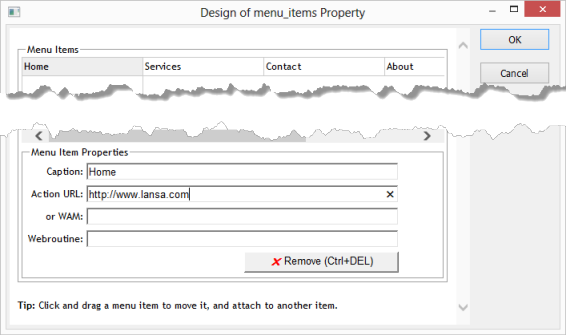
3. In this step you will define an Applications top level menu item, underneath menu item Home and then drag it into the top level, between Home and Services.
Click Click in the menu item below Home and in the Menu Item Properties, enter Applications. The Design of menu_items Property dialog should now look like the following:
...