Page History
...
In this step you will create a new WAM based on supplied RDMLX code, set up the web page for each WebRoutine and then add the toolbar to the WAM layout.
1. Create a new WAM iiiEmpMaint_TB – Employee Maintenance with Toolbar, using Weblet Template iiilay01, based on the code supplied in WAM105. Appendix
...
A.
2. Compile the WAM.
3. Examine the WAM code and note the following:
- Fields HIDEDEL, HIDESRCH, HIDENEW, HIDESAVE are globally mapped as hidden fields – these fields control whether the tool bar icons are shown.
- Field WRNAME is also mapped globally as a hidden field. This is used to control which WebRoutine the Save button calls.
- The WebRoutines set the value of the "HIDExxx" fields as appropriate. For example the Begin WebRoutine shows only the New toolbar icon.
4. Open the begin WebRoutine in the Design view, add a row to the table and add pushbuttons with a caption of List and Grid and with on_click_wrname values of emplist and empgrid respectively. These buttons do not require a submitFieldValues property.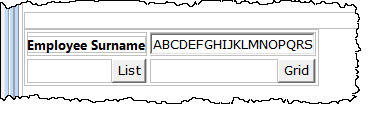
5. Open the emplist WebRoutine in the Design view. Drop an Anchor weblet onto the employee number field in the first list column. Set up the Anchor weblet properties as shown:
Property | Value |
|---|---|
currentrowhfield | EMPNO |
currentrownumval | $EMPNO |
Reentryvalue | M |
on_click_wrname | maint |
...