Page History
...
- What is the business process?
- The user interface
- A new web application will require many WAMs and many web pages. Start by drawing up a plan of the web site and the navigation it will require.
- What WebRoutines will be required?
- What working lists, group_bys, working fields need to be defined?
- What weblets can be used to enhance the user interface?
- What working lists will be required to support these weblets?
- How do fields and lists need to be mapped into and out of each WebRoutine?
- In a new WAM create your WebRoutines and WEB_MAPS before coding your application logic
- When you add a new WebRoutine to a WAM, the XML/XSL will be built at compile time.
| Info |
|---|
| Avoid creating very large WAMs with too many WebRoutines. Each time a WebRoutine is invoked from the browser, the WAM loads and then unloads. Many small WAMs is a much better design and will be easier to maintain. |
1. Create a new WAM.
Name: iiiSecMaint
Description: Section Maintenance
Layout weblet: iiilay01
...
Consider the first two screen captures shown in the Objectives section that show the Begin WebRoutine in operation. This WebRoutine initially displays a list of sections that is empty and an input field for a department code. An AutoComplete weblet will replace the Department Code input field. A Select push button invokes the Begin WebRoutine that builds a list of sections for the department and displays this list.
...
Consider what working lists will be needed to handle this web page and what logic will be necessary?
a. Define a work field DEPT_IN based on DEPTMENT, this will be the department code input field.
b. Define working list DEPTS, to support the AutoComplete weblet. The list contains the field DEPTMENT only.
c. Define working list SECTLIST, to support the list of sections containing STDSELECT, SECTION, SECDESC, SECADDR1. Note: All fields apart from STDSELECT should have an *output attribute.
d. Map STDRENTRY globally as a hidden field.
2. Define a WebRoutine named Begin, based on the following pseudo code
     Map field DEPT_IN for * both
     Map for *output the Sections working list, SECTLIST
     Case of field STDRENTRY
     * Select Push Button
     When = S
     clear list SECTLIST
     select fields in working list from the section table with the key dept_in
     add entry to working list
     end of select loop
     end of case loop
3. Define a response WebRoutine AutoComplete to build the list DEPTS to support the AutoComplete weblet
     Define WebRoutine AutoComplete with a Response(*JSON) keyword
     Map DEPT_IN for input
     Map list DEPTS for output as a *JSON list
     Convert the first character of DEPT_IN to uppercase
     clear list of departments
     Select DEPTMENT from the file DEPTAB with the key DEPT_IN, with a Generic(*yes) keyword
     Add an entry to the department list
     end select
     end subroutine
...
Your completed code should now look like the following:
...
     Function Options(*DIRECT)
     Begin_
...
Com Role(*
...
EXTENDS #PRIM_WAM)
...
Layoutweblet('iiilay01')
...
Define Field(#dept_in)
...
 Reffld(#deptment)
     Def_
...
List Name(#depts)
...
Fields(#deptment)
...
 Type(*Working)
     Def_
...
List Name(#sectlist)
...
Fields(
...
#STDSELECT (
...
#SECTION *out)
...
(
...
#SECDESC *out)
...
(
...
#SECADDR1 *out))
...
 Type(*Working)
     Web_
...
Map For(*both)
...
Fields((
...
#stdrentry *hidden))
...
WebRoutine Name(Begin)
...
Desc('
...
Select a Department')
     Web_
...
Map For(*both)
...
Fields(#dept_
...
in #sectlist)
     Case (#stdrentry)
...
When (=
...
 S)
     Clr_
...
List Named(#sectlist)
...
Select Fields(#sectlist)
...
From_File(sectab)
...
 With_Key(#dept_in)
     Add_
...
Entry To_List(#sectlist)
     Endselect
     Endcase
...
     Endroutine
     WebRoutine Name(AutoComplete)
...
 Response(*JSON)
     Web_
...
Map For(*input)
...
 Fields(#dept_in)
     Web_
...
Map For(*output)
...
Fields((
...
#depts *json))
     #dept_
...
in :=
...
#dept_in.substring(
...
 1, 1 ).upperCase
     Clr_
...
List Named(#depts)
...
Select Fields(#deptment)
...
From_File(deptab)
...
With_Key(#dept_in)
...
 Generic(*yes)
     Add_
...
Entry To_List(#depts)
     Endselect
     Endroutine
     End_Com
...
4. Compile your WAM and open the Begin WebRoutine in the Design view.
...
Your web page should look like the following: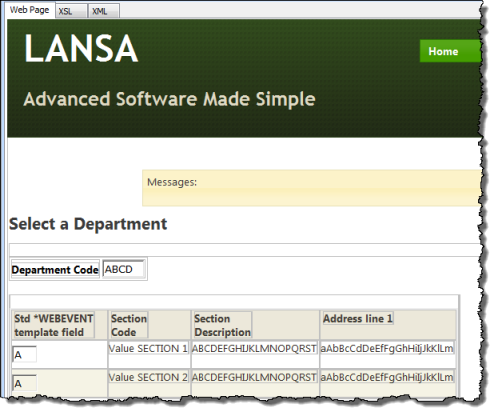
5. Drag and drop an jQuery UI AutoComplete weblet onto the Department Code field. Select the Details tab and set up the AutoComplete properties:
Property | Value |
|---|---|
sourceWrName |
|
Listname |
|
valueField |
|
|
6. If the Select column (field STDSELECT) is shown as an input field (i.e. it does not have a clickable image weblet field visualization defined in the Repository), drop a Clickable Image weblet into the field in the first column.
7. With the clickable image selected, select the Details tab and set up its properties:
Property | Value |
|---|---|
currentrowhfield | SECTION |
currentrownumvalue | $SECTION |
Rentryvalue | S |
tooltip | Select a Section |
on_click_wrname | Details |
|
Note:
- To return a field value from a list define the value as $FIELDNAME (upper case). i.e. $SECTION in this case.
- Although 'SECTION' is an *output field in the list, you can return a field value via the clickable image weblet.
- The Details WebRoutine is not yet defined in your WAM, so you need to type in this value for the on_click_wrname property.
...