Page History
[  |../../index.htm#lansa/lansa050_2275.htm]
現在地: RAMP-TSガイド > スクリプト > 使用方法 > ビジュアル識別子とプログラム的識別子
...
インスタンスリストのエントリーには、必ずビジュアル識別子とプログラム的識別子を定義する識別プロトコルがあります。インスタンスリストを制御するフィルターを作成するときにこれらの識別子を設定します。
(識別プロトコルの詳細は、『Visual 識別プロトコルの詳細は、『Visual LANSAフレームワーク ガイド』のガイド』の「インスタンスリストとインスタンスリスト・マネージャー」を参照してください。)
例えば、社員のフィルターにある次の LANSA コマンドは、インスタンスリストにエントリーを追加し、そのエントリーのプログラム的識別子、ビジュアル識別子、および追加の列を設定します。
Invoke Method(#avListManager.AddtoList) Visualid1(#Empno) Visualid2(#FullName) Akey1(#Deptment) Akey2(#Section) Akey3(#Empno) AColumn1(#PhoneHme) AColumn2(#Address1) nColumn1(#PostCode)
この識別プロトコルでは、
- 3 番目のプログラム的識別子 (AKey3) には、社員番号が入ります。
- 2 番目のビジュアル識別子 (VisualId2) には、社員の名前が入ります。
...
識別プロトコルを理解していれば、インスタンスリストで現在選択されている社員の番号と名前を表示する JavaScript を作成できます。
/* Get the current instance list details */...
uShowEmpDetails : function ()
...
{...
...
...
var strEMPNO = objListManager.VisualId1
...
[0...
];...
/* 3rd Akey is the number
...
*/
...
...
var
...
strNAME = objListManager.VisualId2
...
[0...
]; /* 2nd VisualId is the name */...
...
...
alert("Current employee number is " + strEMPNO);
...
...
 alert("Current employee name is " + strNAME);
},
次のように表示されます。
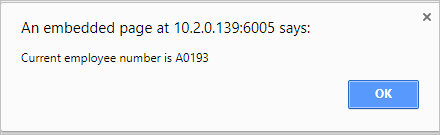
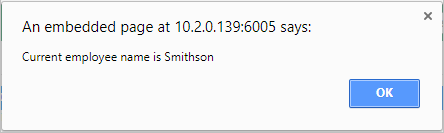 \},
次のように表示されます。
!worddavaf485e25f57cd86bb5b0fc63f3f1b1cc.png|height=32,width=32!
!worddavaf485e25f57cd86bb5b0fc63f3f1b1cc.png|height=32,width=32!
[ !worddavaf485e25f57cd86bb5b0fc63f3f1b1cc.png|height=32,width=32! |../../index.htm#lansa/lansa050_2275.htm]
\},
次のように表示されます。
!worddavaf485e25f57cd86bb5b0fc63f3f1b1cc.png|height=32,width=32!
!worddavaf485e25f57cd86bb5b0fc63f3f1b1cc.png|height=32,width=32!
[ !worddavaf485e25f57cd86bb5b0fc63f3f1b1cc.png|height=32,width=32! |../../index.htm#lansa/lansa050_2275.htm]