Page History
...
This exercise provides a custom weblet (iii_ListRow) for you to use. Although you will not be examining its XSL and HTML, it will demonstrate how list data can be treated in a different way.
The List Row Weblet (iii_ListRow)
...
- The data fields – the values you want to output
- Fields holding the labels (or captions) for each of the output fields.
- A field containing a path and file name for a small employee image.
- Each row is wrapped in a <fieldset> tag. The list also contains a field and label field for the <legend> tag that provides the caption at the top left corner of the group box that the fieldset provides.
- The WebRoutine should map the working list with a *private attribute, since the List Row weblet will format the output.
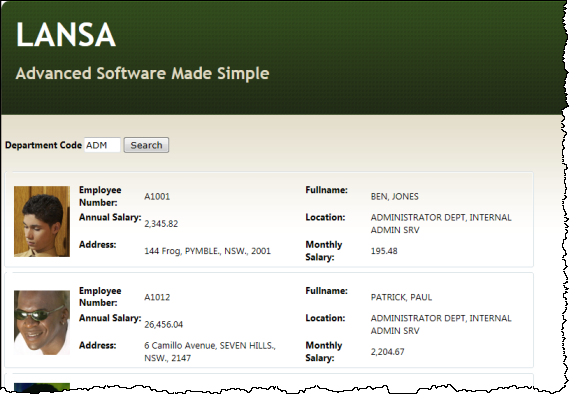
The WAM will be a simple enquiry that lists employees by department.
To complete this exercise, complete the following:
Step 1. Create the List Row Weblet – iii_ListRow
Step 2. Create WAM iiiUseListRowWeblet
| Anchor | ||||
|---|---|---|---|---|
|
...
Copy the images from the PHOTOS folder into to your web server /images path, such as: C:\Program Files (x86)\LANSA\WebServer\images. If you are running your WAMs on the IBM i, copy this folder to: /LANSA_<PGMLIB>/webserver/images where <PGMLIB> is your LANSA program library.