Versions Compared

Key

  • This line was added.
  • This line was removed.
  • Formatting was changed.

IDERA SQL Compliance Manager build includes many fixed issues, including the following updates.

Expand
title7.0 New features

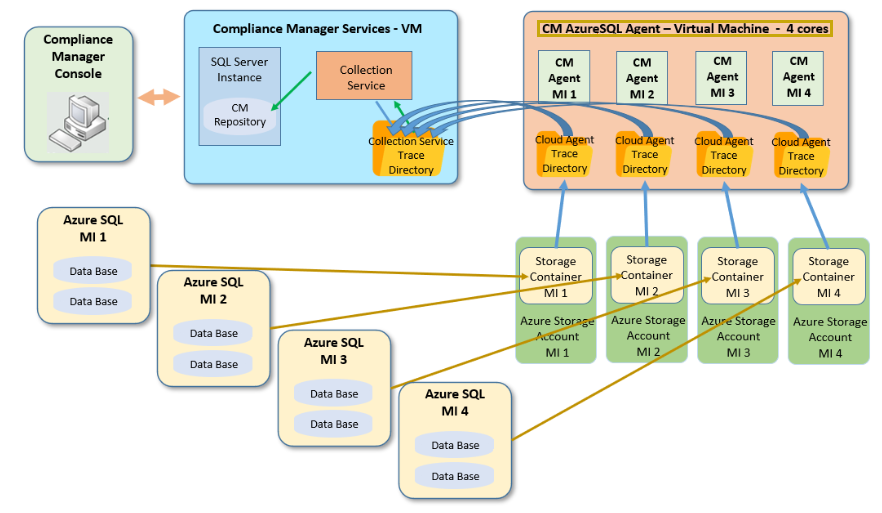
SQL Compliance Manager 7.0 extends the capabilities of the current SQL CM to support auditing on Azure SQL-managed instances. This feature allows users to provide new audit capacities for Azure MI (managed instances) where the log files are gathered in the collection service trace directory and data is saved in the CM repository that can be accessed through the CM console.

Image Added

Expand
title7.0 Fixed issues

There are no fixed issues with this release.

Expand
title6.4 New features

Anchor
SQLCM-6885
SQLCM-6885
SQL Compliance Manager version 6.4 brings significant updates, including adherence to the latest DISA STIGs compliance. Addressing the recent implementations made to the Security Technical Implementation Guide (STIG), which is a set of guidelines from the Department of Defense's (DoD) Defense Information Systems Agency (DISA) to help secure software and information systems. 

STIGs are based on DoD policy and security controls to help developers configure hardware and software and implement security protocols. This crucial enhancement keeps you informed and up-to-date with the latest security guidelines.

The following is a subset of DISA STIGs implemented for the SQL CM 6.4 release:

  • SQL6-D0-011800 - enforcement of access restrictions.
  • SQL6-D0-014900 - records of privileged activities.
  • SQL6-D0-015000 - unsuccessful attempts to execute privileged activities.
  • SQL6-D0-015100 - starting/ending time of user access.
  • SQL6-D0-014200 - successful/unsuccessful attempts to delete privileges.
  • SQL6-D0-013600 - unsuccessful attempts to modify privileges.

...

Expand
title6.3 Fixed issues
  • Anchor
    SQLCM-6883
    SQLCM-6883
    Fixed an issue where DDL events were not captured for server-level privilege users configured through a domain group.
  • Anchor
    SQLCM-6364
    SQLCM-6364
    Resolved the issue where the Regulatory Compliance Check report showed "No" at server-level for PCI DSS guidelines. 
  • Anchor
    SQLCM-6860
    SQLCM-6860
    Fixed an issue where the IP Address Auditing checkbox was unchecked after importing an exported audit setting file.
  • Anchor
    SQLCM-6855
    SQLCM-6855
    Addressed an issue with Audit Events not appearing on SQLCM console when CM repo was hosted on a Case Sensitive SQL instance.
  • Anchor
    SQLCM-6816
    SQLCM-6816
    Solved the issue of multiple alerts being logged for a single event.
    • The number of Data and Event alerts is consistent with the number of audit events generated.
    • The email alerts have been improved with the appropriate event description.
  • Anchor
    SQLCM-6887
    SQLCM-6887
    Fixed an issue with random disappearance of databases from the audited database list.
Expand
title6.2 New features
  • Anchor
    SQLCM-6619
    SQLCM-6619
    SQL Compliance Manager 6.2 improved to determine if an Alert Rule has been configured as 'Email Notification' or 'Email Summary Notification', users no longer are required to edit the alert rule. The rule description has been enhanced to make it convenient to distinguish between the two without the need for alert rule modifications.
  • Anchor
    SQLCM-6761
    SQLCM-6761
    SQL Compliance Manager 6.2 upgraded to provide a CLI command line for registering a server, grooming, archiving, and verifying audit data integrity - version 6.2 is now augmented with CLI for enabling and disabling auditing servers.
  • Anchor
    SQLCM-6695
    SQLCM-6695
    SQL Compliance Manager 6.2 improved and added the number of rows at the end of the reports to ease access to the information contained in each report.
  • Anchor
    SQLCM-6760
    SQLCM-6760
    SQL Compliance Manager 6.2 enhanced security by deploying a strong Advanced Encryption Standard (AES) algorithm to meet the latest high standards of our large enterprise customers. The Advanced Encryption Standard (AES) is an algorithm that uses the same key to encrypt and decrypt protected data. Instead of a single round of encryption, data is put through several rounds of substitution, transposition, and mixing to make it harder to compromise.
Expand
title6.2 Fixed issues
  • Anchor
    SQLCM-6748
    SQLCM-6748
    DDL, DML, and DROP events are correctly shown in the "Audit Events" tab after performing the DDL action on the "Sensitive Column" when using the "via Audit Logs" collection method.
  • Anchor
    SQLCM-6728
    SQLCM-6728
    Audit events for "insert" are accurately being recorded for Sensitive columns with "select and DML activity" enabled.
  • Anchor
    SQLCM-6729
    SQLCM-6729
    Resolved the issue where Trace events were not being correctly captured for "delete from <table>" audit events when sensitive columns with "select and DML activity" were configured.
  • Anchor
    SQLCM-6403
    SQLCM-6403
    Fixed an issue where the number of Logout events captured was significantly more than the number of Login events.
  • Anchor
    SQLCM-6539
    SQLCM-6539
    Resolved the issue where a warning message was displayed in the Event Viewer after execution of the trace file out to the collection Server for processing.
  • Anchor
    SQLCM-6773
    SQLCM-6773
    Fixed an issue where the "Delete" DML events were shown twice after executing a single "Delete" query on the "Sensitive Columns" table when "Trace" or "Audit Logs" collection methods were used.
  • Anchor
    SQLCM-6769
    SQLCM-6769
    Resolved the issue where the events table integrity check did not detect changes done on hash columns.
  • Anchor
    SQLCM-6750
    SQLCM-6750
    The “SQL Statement” content is correctly displayed in the “Event Properties” after executing the DDL query if the “via SQL server Audit specification” is used.
  • Anchor
    SQLCM-6749
    SQLCM-6749
    Resolved the issue where the "+" icon was missing for the DDL column-sensitive event in the "Audit Events" tab.
  • Anchor
    SQLCM-6721
    SQLCM-6721
    Addressed an issue where the layout was broken for reports downloaded in PDF and TIF formats.
  • Anchor
    SQLCM-6697
    SQLCM-6697
    Resolved an issue where Events were not captured as expected with Extended Events and SELECT auditing was enabled.
  • Anchor
    SQLCM-6671
    SQLCM-6671
    Fixed the issue where the Bin file was not getting updated for the Privileged User set up through a domain group at the server level.
  • Anchor
    SQLCM-6629
    SQLCM-6629
    Resolved an issue where "Unknown Publisher" was displayed in the "User Account Control" when installing SQLCM.
  • Anchor
    SQLCM-6664
    SQLCM-6664
     
    Addressed an issue where an error message would come up when trying to import audit settings.
Expand
title6.1 New features
  • Anchor
    SQLCM-6350
    SQLCM-6350
    SQL Compliance Manager 6.1 adds a new feature “Auditing the IP address of the source of an event” which allows SQL Compliance Manager to capture and record the IP address of the source of an event along with other relevant information. It is configurable in the Audited Activities tab.
  • Anchor
    SQLCM-6458
    SQLCM-6458
    SQL Compliance Manager 6.1 improved to detect all the manual changes made to the [Events] and [EventSQL] tables by an Integrity Check.
  • Anchor
    SQLCM-6608
    SQLCM-6608
    SQL Compliance Manager 6.1 adds support for Windows 11 and Windows Server 2022 for installation and features. For more information on the operating system support, visit the Software Requirements page.
Expand
title6.1 Fixed issues
  • Anchor
    SQLCM-6435
    SQLCM-6435
    When running reports in both the Windows Console and Reportings Services you can now select multiple instances in the <Server Instance> dropdown.
  • Anchor
    SQLCM-6495
    SQLCM-6495
    Report Results rows now can be configured to use more than 10K Event Records.
  • Anchor
    SQLCM-6486
    SQLCM-6486
    Added a Horizontal Line in the Reports allowing users to adjust the space that the filters or the report use at any given time. Also added a horizontal scrollbar allowing the user to navigate through the reports.
  • Anchor
    SQLCM-6438
    SQLCM-6438
    Resolved the issue where running the SQL Server Reporting Services listed all users in a long string in the report output when all users are selected.
  • Anchor
    SQLCM-6368
    SQLCM-6368
    Fixed an issue where an error occurred during the setup of the Collection Service account with a password longer than 32 characters during the installation.
  • Anchor
    SQLCM-6506
    SQLCM-6506
    Resolved the issue where auditing via extended events and making changes to the temp-tables caused to "Audit all user tables" when "DML\SELECT Filters" was configured.
  • Anchor
    SQLCM-6377
    SQLCM-6377
    Resolved an issue where the DataChanges table showed a number of eventId
    ` s with a value of NULL.
  • Anchor
    SQLCM-6482
    SQLCM-6482
    Fixed an issue where the error prompted "An item with the same key has already been added" prompted while loading configuration for the SERVER and occurred when having two databases with the same id but different names.
  • Anchor
    SQLCM-6526
    SQLCM-6526
    Resolved the issue where SSMS native activities were picked up when using Extended Events as the collection method.
  • Anchor
    SQLCM-6440
    SQLCM-6440
    Resolved the issue where an error appeared when opening Excel export of "Regulatory Compliance Check" report in SSRS.
  • Anchor
    SQLCM-6441
    SQLCM-6441
    Fixed the issue where the Audit Events View didn't keep custom columns after the console was restarted.
  • Anchor
    SQLCM-6458
    SQLCM-6458
    Fixed an issue where making changes to the [EventSQL] table was not picked up by the Integrity Check.
  • Anchor
    SQLCM-6591
    SQLCM-6591
    Resolved an issue where the Login Filter was recording the same login multiple times.
  • Anchor
    SQLCM-6359
    SQLCM-6359
    Excel report export no longer rounds up event timestamps.
  • Anchor
    SQLCM-6267
    SQLCM-6267
    Resolved an issue where Trusted User registration was case-sensitive for an auto-registered new database while it was case-insensitive for manually registered databases.
  •  
Expand
title6.0 New features
  • Anchor
    SQLCM-6350
    SQLCM-6350
    SQL Compliance Manager 6.0 extends the capabilities of the current SQL CM Agent to support remote auditing on SQL servers on EC2. Allowing users to add SQL Servers active on the share network location to write/read data and support DBaaS SQL Server Instances.  The Cloud Agent consists of the same behavior and functionality as the current SQL Agent, but the RDS agent is a separate agent deployed into the cloud with its own configuration auditing settings.
  • Anchor
    SQLCM-6489
    SQLCM-6489
    SQL Compliance Manager 6.0 adds support for Amazon RDS to audit servers, databases, Sensitive Data, and Activities while alerting and reporting on them. Users can select Amazon RDS as their Server Type when adding a new server in the Specify SQL Server configuration window. According to the selection, SQL CM asks to Specify Connection Credentials for the authentication, and once registered, users can begin auditing the database activity on that server.
  • Anchor
    SQLCM-6557
    SQLCM-6557
    SQL Compliance Manager 6.0 permits the creation of storage accounts to place its components within AWS. In Amazon RDS, users can audit Microsoft SQL Server databases using the built-in SQL Server auditing mechanism. For additional information on Support for SQL Server Audit, visit the SQL Server Audit User Guide.
  • Anchor
    SQLCM-6555
    SQLCM-6555
    Upon upgrading to SQL CM 6.0 or preparing a new installation, SQL Compliance Manager Event Collection Method Capture Default Setting changes to "SQL Server Audit Specifications". All audit logs for 'DML and Select Activities' are captured and filtered properly both for the existing CM architecture and the cloud support platform. 
Expand
title6.0 Fixed issues
  • Anchor
    SQLCM-6555
    SQLCM-6555
    Resolved the issue where users were mistakenly prompted for an agent upgrade. Now, if the Agent is on the latest version, the Upgrade Agent displays as a non-clickable out.
Expand
title5.9 New features

There are no new features in this release.

Expand
title5.9 Fixed issues
  • Anchor
    SQLCM-6385
    SQLCM-6385
    Exporting Audit Settings now successfully includes an export of the Server Level Trusted Users configured
  • Anchor
    SQLCM-6259
    SQLCM-6259
    Resolved the issue where the SQL Server Properties window displayed the version as Unknown for registered SQL Server 2019 instances. Now, the correct version is shown. 
  • Anchor
    SQLCM-6407
    SQLCM-6407
    Resolved the issue where auditing stopped working when a user-configured Sensitive Column auditing without first selecting the DML or SELECT option caused the SQLcompliance Agent to have problems creating the sp_SQLcompliance_AuditXE  stored procedure.
  • Anchor
    SQLCM-6277
    SQLCM-6277
    Resolved the issue where Events were not captured for sensitive columns when SELECT and DML are not enabled at database-level audited activities on fresh and upgraded setups.
  • Anchor
    SQLCM-6463
    SQLCM-6463
    The DML Activity (Before-After) report shows accurate results regardless of the collection method being set to Extended Events or SQL Tracing.
  • Anchor
    SQLCM-6460
    SQLCM-6460
    The DML\SELECT filters are now working correctly when auditing SQL Server 2019 and no longer prevent DML and SELECT activities from being audited accordingly.
  • Anchor
    SQLCM-6457
    SQLCM-6457
    The following error is no longer observed when attempting to run DML changes on a table configured for Before-After auditing in the software.
    "The DELETE permission was denied on the object 'SQLcompliance_Changed_Data_Table'."
  • Anchor
    SQLCM-6379
    SQLCM-6379
    The retention period of the Activity Log is now configurable. It is set to a default of 60 days which can be modified in the SQLcomplianceCollectionService.exe.config file in the MAX_ACTIVITY_LOGS_AGE flag.
  • Anchor
    SQLCM-6376/6365
    SQLCM-6376/6365
    Console loading times are faster now at both console startup and when navigating to the Audit Events view of the audited server or database.
  • Anchor
    SQLCM-6370
    SQLCM-6370
    Event details on INSERT and DELETE events, audited not as INSERT INTO or DELETE FROM executions, are no longer missing the Target Object Name information, showing the name of the database object affected by the audited DML change.
  • Anchor
    SQLCM-6349
    SQLCM-6349
    Reports deployed to SQL Server Reporting Services now show corresponding logins in the Login dropdown filter when these are set to run against an archived database.
  • Anchor
    SQLCM-6223
    SQLCM-6223
    Reports no longer show a syntax error when executed either from the console application or SQL Server Reporting Services.
  • Anchor
    SQLCM-6149
    SQLCM-6149
    The permissions check for the SQL Server service account permissions on the Agent Trace Files folder no longer fails when the SQL Server is running under the NETWORK SERVICE service account.
  • Anchor
    SQLCM-6327/6193
    SQLCM-6327/6193
    Data types have been updated in the tables saving Before-After data to prevent the tables from filling up with event data too soon. This would have prevented new events from processing otherwise, as a result.
  • Anchor
    SQLCM-6367
    SQLCM-6367
    The console application logging is no longer showing a collation conflict error, as shown below: 
    "Cannot resolve the collation conflict between "SQL_Latin1_General_CP1_CI_AS" and "Latin1_General_CI_AS" in the equal to operation."
Expand
title5.8.1 New features

There are no new features in this release.

...

Expand
title5.8.0 New features
  • Anchor
    SQLCM-6206
    SQLCM-6206
    The default settings for capturing DML and Select activities were changed to Extended Events on SQL Compliance Manager 5.8. This change provides a significant performance improvement for the collection service efficiency in event collection, as well as on the performance impact on monitored instances.
  • Anchor
    SQLCM-6207
    SQLCM-6207
    SQL Compliance Manager 5.8 introduces a new highly optimized index format where the application upgrades indexes in the background from a none compression state to a page-level compression type. This operation is done as an Online operation for supported SQL Server editions. Currently, the SQL Compliance Manager repository does not utilize the optimized indexes format. Rebuilding the indexes into the new optimized format provides a significant performance enhancement to the Management Console when viewing audited events and provides a considerable database repository size reduction resulting in less space usage on disk. For more information see Indexes rebuild operation
  • Anchor
    SQLCM-6210
    SQLCM-6210
    SQL Compliance Manager 5.8 modified the Collection Server and Agent to allow a mode where trace files are transferred by the Agent to the Collection Server without compression. Transferring files from the Agent to the Collection Server without compression provides a significant performance enhancement both on the server side in event collection efficiency, and it reduces the performance impact on the monitored instances. In the Agent Properties window, users with Agents in version 5.8 have the option to decide whether to compress or not compress the file transfer from the Agent directory to the Collection directory. For more information, see Agent Properties - Trace Options tab

...

Expand
title5.6.1 New features

General

Sensitive Column Search

SQL Compliance Manager version 5.6.1 introduces the Sensitive Column Search functionality, allowing you to search all of the tables and columns on a targeted database to discover the sensitive data location that needs to be audited. For more information, see  Sensitive Column Search window 

Expand
title5.6.1 Fixed issues

Installation and Configuration issues

  • Anchor
    SQLCM-5846
    SQLCM-5846
    Resolved the issue where the Stored Procedure did not get disabled for the secondary node, which caused an accumulation of trace files on the secondary node.
  • Anchor
    SQLCM-5539
    SQLCM-5539
    Resolved the issue which caused DML/SELECT filter settings to import incorrectly.
  • Anchor
    SQLCM-5514
    SQLCM-5514
    Resolved the issue where an error message appeared in the SQL Server Logs about an invalid call to stored procedure master.dbo.sp_SQLcompliance_AuditXE .
Expand
title5.6.0 New features

General

Capture Logout Events

Currently, SQL Compliance Manager captures Logins and Failed Logins; with SQL CM version 5.6, users have the ability to capture Logouts as a separate tracking option for their registered servers and for their configured Server Level Privileged Users.

Default Audit Configuration Settings

SQL Compliance Manager provides users with the capability to set up a single Server default setting and a single Database default setting. Allowing users to set up newly added Servers and Databases with their exact desired settings. Users also have the ability to apply those default settings to already registered Servers and Databases. By default, SQL CM provides users with the Idera Default Settings, which are a set of basic settings to help users start auditing from the moment a Server is registered. For more information about this feature, see Default Audit Settings

Add Databases Automatically

SQL Compliance Manager version 5.6 provides users with the ability to enable their Server Instances to automatically add any new database that is created on an audited server. For more information about this feature, see Registered SQL Server Properties - Advanced tab.

Configurations Clarifications

Compliance Manager version 5.6 improved the configurations setting to help users have a clear understanding of what is being audited at the Server level and what is being audited at the Database level. Implementing a new logic that shows items checked and unavailable for deselection at the Database level since those items are already selected at the Server level.

Info

Please note that it is possible that with the setting inheritance, you may collect more data, to avoid doing so, please review your settings to ensure that all items all collected as you expect.

Server-Level Trusted Users

SQL Compliance Manager version 5.6 allows users to configure Trusted Users at the Server level. Trusted Users designated at the Server level will apply across all databases in the selected server, giving users a greater control over who is monitored at what level. For more information, see Trusted Users at Server level.

Sensitive Columns Auditing

SQL Compliance Manager version 5.6 updated the Sensitive Column functionality in order to alert users if PII data is selected or altered. To know if such data has been accessed, users can choose to collect information for Select Only, Selects, and DML or for All Activity. 

Web Console Updates

SQL Compliance Manager version 5.6 removed all the configuration settings from the Web Console to help users have a greater control over who can change audit data while still allowing granted users to view the information being audited. Centralizing the setting configurations to the Desktop Console only, makes the Web Console a place where Auditors and Executives can easily use Reports and Alerts to see the information that they need to see.  

Anchor
SQLCM-5503
SQLCM-5503
Log File

SQL Compliance Manager version 5.6 includes a new Log file that keeps track of the product ́s versions and upgrades. The new Log file, found in the SQL CM installation folder, help users track the timelines for upgrade versions.

Anchor
SQLCM-566
SQLCM-566
Non-sysadmin

SQL Compliance Manager version 5.6 provides users with the ability to register a non-sysadmin role with permission to run the Compliance Manager Agent and permission to access the trace files.  

Anchor
SQLCM-566
SQLCM-566
Increase the number of threads processed

SQL Compliance Manager version 5.6 added the option to adjust the number of threads that can be used to process trace files at a time. 

Regulatory Guidelines

GDPR Regulation

SQL Compliance Manager version 5.6 added the General Data Protection Regulation (GDPR) guideline to the selectable list of regulatory guidelines, providing users with the option to select GDPR guideline and comply with their auditing needs. For more information about this feature, see Comply with Specific Regulations

Reports

Configuration Check Report

SQL Compliance Manager version 5.6 implemented the Configuration Check Report, which allows users to compare the settings configured on the registered servers and databases with the previously defined default settings. This report allows users to quickly identify where settings may vary from what is defined as the default settings as well as to identify the differences in the configurations across your registered servers and databases. For more information about this feature, see Available Reports.

Regulation Compliance Check Report

SQL Compliance Manager version 5.6 implemented the Regulation Compliance Check Report, which allows users to review the configurations set for all registered servers and databases and determine if settings comply with the selected Regulatory Guideline. This report compares the server and database configured settings to the predefined settings for any IDERA supported Regulation Guideline. For more information about this feature, see Available Reports.

Expand
title5.6.0 Fixed issues

Installation and Configuration issues

  • Anchor
    SQLCM-5526
    SQLCM-5526
    SQL Compliance Manager version 5.6 resolved the issue where the Compliance Manager Windows Console rebooted after installing or upgrading the SQL Server 2012 Native client version. 
  • Anchor
    SQLCM-3040
    SQLCM-3040
    Resolved an issue where SQL Compliance Manager recorded Create/Drop index events as “Alter User Table” events.
  • Anchor
    SQLCM-5421
    SQLCM-5421
    SQL Compliance Manager version 5.6 implemented updates in the Sensitive Column functionality which resolved the issue where Sensitive Column events were not displayed if accessed from a view.
  • Anchor
    SQLCM-5100
    SQLCM-5100
    Resolved an issue where SQL Compliance Manager was not capturing BAD auditing information when two objects with the same name exist in the same schema.
  • Anchor
    SQLCM-5317
    SQLCM-5317
    SQL Compliance Manager version 5.6 resolved the issue where SQL Statements for DDL activities was not getting captured.
  •  
    Anchor
    SQLCM-3773
    SQLCM-3773
    SQL Compliance Manager version 5.6 resolved the issue which did not allow users to remove a database from the Administration pane. 
  • Anchor
    SQLCM-4963/4974
    SQLCM-4963/4974
    Resolved an issue where users were able to register active audited databases to archived SQL Servers.
  • Anchor
    SQLCM-5239
    SQLCM-5239
    Resolved an issue where the Capture SQL statements for DDL activities and Security Changes option could not be selected unless the Database Definition (DDL) option was saved first. 
  • Anchor
    SQLCM-5104
    SQLCM-5104
    Resolved the issue where no events got captured for traces performed by non-privileged users.
  • Anchor
    SQLCM-5281
    SQLCM-5281
    Resolved the issue where using encrypted credentials to deploy SQL Compliance Manager performing a silent installation returned an authentication error message. 
  • Anchor
    SQLCM-5229
    SQLCM-5229
    Resolved the issue where SQL Compliance Manager was not able to process alerts when a Group of users is set as a Privileged User.

...

Expand
title5.0.0 Fixed issues
  • Anchor
    SQLCM-2428
    SQLCM-2428
    Active Trace is now properly cleared when necessary.
  • Anchor
    SQLCM-2386
    SQLCM-2386
    A change to the SQL Compliance Manager login filter settings from minutes to seconds fixes an issue that allowed new user events such as failed login attempts to be missed in reports.
  • Anchor
    SQLCM-2348
    SQLCM-2348
    You can now view Reports in .CSV format.
  • Anchor
    SQLCM-3247
    SQLCM-3247
    SQL Compliance Manager 5.0 includes an update that clarifies alert email triggers when users to have two alert rules for Sensitive Columns.
  • SQL Compliance Manager no longer displays conflicting data by including a fix that forces the collection of object names while processing trace file records.
  • Anchor
    SQLCM-2401
    SQLCM-2401
    Regular user accounts are no longer able to capture SQL text used in admin activities without enabling additional options.
  • Anchor
    SQLCM-3090
    SQLCM-3090
    When you have multiple columns selected for a particular table in Before-After Data (BAD), SQL Compliance Manager no longer labels events that update other columns as BAD events.
  • Anchor
    SQLCM-2384
    SQLCM-2384
    SQL Compliance Manager now includes descriptions for ALTER ANY SCHEMA and ALTER ANY USER in the tracejob.cs file.
  • The permissions check process is updated in SQL Compliance Manager 5.0 to avoid any issues when performing a check.
  • Anchor
    SQLCM-2350
    SQLCM-2350
    Event types 158 and 258 now include expanded details that display when these types of events occur.
  • Anchor
    SQLCM-2446
    SQLCM-2446
    SQL Compliance Manager Integrity Check now properly tracks and reports on deleted rows.


Scroll pdf ignore
Newtabfooter
aliasIDERA
urlhttp://www.idera.com
 | 
Newtabfooter
aliasProducts
urlhttps://www.idera.com/productssolutions/sqlserver
 
Newtabfooter
aliasPurchase
urlhttps://www.idera.com/buynow/onlinestore
 | 
Newtabfooter
aliasSupport
urlhttps://idera.secure.force.com/
 | 
Newtabfooter
aliasCommunity
urlhttp://community.idera.com
 
|
 
Newtabfooter
aliasResources
urlhttp://www.idera.com/resourcecentral
 | 
Newtabfooter
aliasAbout Us
urlhttp://www.idera.com/about/aboutus
 
Newtabfooter
aliasLegal
urlhttps://www.idera.com/legal/termsofuse

...