Page History
...
Running the Migration Jobs
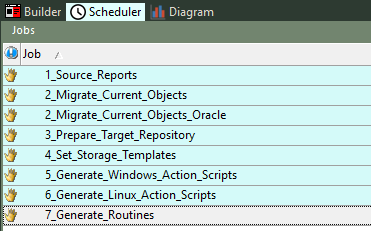
Run the migration Jobs , one at a time, in following the order specified in at the beginning of the job name.
The largest and longest job will be is '2_Migrate_Current_Objects' and takes the longest to complete, this job should be completed successfully before continuing with Job 3. If there are any failures in Job 2, you should view the failure reason and restart the job at the point of failure from the Azkaban Scheduler Dashboard directly, by rerunning the failed execution.
| Note |
|---|
2_Migrate_Current_Objects is intended for SQL and Teradata source repositories, 2_Migrate_Current_Objects_Oracle is intended for Oracle only. Ensure you only one of these jobs depending on your source metadata repository type. |
If there are any failures in Job 3, you can complete that the job manually via from the RED UI by running the scripts in the order as outlined in the following Migration Scripts Explained section.
After Job 3 has completed, or you have run the scripts manually, please log in to the migrated Destination repository and allow the RED 10 Target Enablement Pack post install process to complete. This is also a good point to check the connections and save a RED Profile for your migrated Destination metadata repository.
...
These are the Migration Tooling Scripts, each script can be run from the RED UI or via the indicated Scheduled Job. If you choose to run these scripts manually, please follow the order carefully as listed here.
...
| Script Name | Purpose | Notes | Job |
|---|---|---|---|
| 1_prepare_migration | Sets up required parameters for the tooling. | Auto-run on startup | n/a |
| 2_target_repo_creation | Creates the RED metadata in the Destination PostgreSQL database. | Auto-run on startup | n/a |
 RUN 1_, and 2_ jobs before the following 'b#_' scripts RUN 1_, and 2_ jobs before the following 'b#_' scripts | These two jobs should be successful before continuing 'b#_' scripts or later jobs. | 1_Source_Reports 2_Migrate_Current_Objects | |
| b1_upgrade_obj_subtypes | Updates the migrated objects subtype keys to be compatible with RED 10. | Run after Migration Job '2_Migrate_Current_Objects' completes. | 3_Prepare_Target_Repository |
| b2_job_metadata_updates | Updates schedules and job states to be compatible with RED 10. | 3_Prepare_Target_Repository | |
| b3_storage_metadata_updates | Creates a new Metadata connection and a Target Location to represent legacy 'local' storage objects then associates those objects to the new target. | 3_Prepare_Target_Repository | |
| b4_reset_identity_sequences | Source metadata keys have been migrated to PostgreSQL as is, so the sequences in PostgreSQL need updating to reflect the migrated data. This script preforms those updates. | 3_Prepare_Target_Repository | |
| b5_target_ep_installation | Uses RedCli to install the RED 10 Target Enablement Pack from the location specified during the initial configuration step to the Destination metadata. | This script requires elevated privilege's since RedCli installs WS modules to the ProgramData directory. If the script fails, then execute it directly from RED after running RED as Administrator. Additionally the RED 10 Target EP must be on a path accessible to the Scheduler Service User if running via the Job. Unpacking the Enablement Pack locally is best. | 3_Prepare_Target_Repository |
| b6_import_sch_integration_scripts | The RED 10 scheduler integration scripts are removed when migrating the script tables, therefore we need to import them again. | 3_Prepare_Target_Repository | |
| b7_apply_legacy_obj_subtypes | OPTIONAL: Creates custom Object Types for legacy object subtypes which don't exist in RED 10, then updates any of those object types to the new custom types. | 3_Prepare_Target_Repository | |
| Log in to the migrated Destination repository to allow the Target Enablement pack to complete it's configurations. | Before running c#_ scripts, log in to the Destination repository and allow the RED 10 Enablement Pack post installation script to complete. | ||
| c1_set_storage_templates | Associates objects with the default storage templates of the target connection they are associated with. This update will not overwrite existing associations and only adds missing templates. | 4_Set_Storage_Templates | |
| c2_generate_windows_action_scripts | RUN EITHER c2 OR c3 OR BOTH: Generates Windows Action Scripts for all objects via RedCli Batch. | long running script, consider running via the scheduled job. You can run either c2 or c3 or both depending on your Scheduler environments. | 5_Generate_Windows_Action_Scripts |
| c3_generate_linux_action_scripts | RUN EITHER c2 OR c3 OR BOTH: Generates Windows Linux Action Scripts for all objects via RedCli Batch. | Long running script, consider running via the scheduled job. You can run either c2 or c3 or both depending on your Scheduler environments. | 6_Generate_Linux_Action_Scripts |
| c4_generate_routines | OPTIONAL: Generates Load/Update routines for all objects. | This is not recommended since it will regenerate all routines using the newer RED 10 templates, instead you should generate routines via the RED UI while logged in to the Destination metadata and only do so for objects that have no associated scripts or procedures. | 7_Generate_Routines |
...