Page History
...
The following sections refer to the management of these fields in each connection properties screen in RED
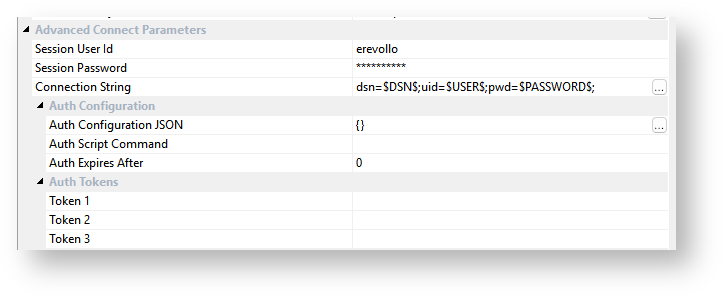
The fields labelled "Session .." are never stored in the metadata and only persist, inAll but one of the fields under Advanced Connect Parameters are stored in-memory, for the duration of the user's session of RED. Only the Connection String field is persisted to the RED Metadata.
Additionally, the users and passwords entered in the Scheduler Configuration screen in RED are never stored in the metadata and only persist, in-memory, for the duration of the user's session of RED.
...
Additionally the Scheduler Configuration credentials are also stored in-memory for the session and included in the Profile when saving it to disk.
The in-memory profile is session based and therefore the credentials are specific to the user logged on during that session. The connection string itself is however stored in the metadata so that each RED user still uses the same authentication method as other users while in the RED UI.
...
| Info | ||
|---|---|---|
| ||
| Session passwords and Auth Tokens are encrypted at rest (on the file in disk) during the save using Windows DPAPI (user-based) encryption. These profile files will therefore only ever be able to be used and decrypted by the Windows user who saved them. |
...
For some authentication methods you may need to include an access token additional authentication tokens in your connection strings. If the token is static or long lived it can be added directly into one of the Auth Token fields in your connection and referenced in your connection string.
For short lived or expiring tokens a Scripted Authentication approach may be required. This is achieved by setting an Auth Script Command on your connection which could execute an authentication workflow script to retrieve access tokens or other authentication values and update the RED Profile file making them available to the RED UI and Scripts connections. This is achieved running an Authorization script command that adds an encrypted access token or other encrypted parameters to your profile file, these tokens and parameters are used as environment variables in your connection strings. You can also set a timer to refresh your connections and tokens; the timer will execute script again modifying the profile with new tokens or parameters. If you use expiring tokens with a the scheduler, you can would need to create and schedule a script to refresh your tokens and update your scheduler profile records, see the Scheduler Configuration section for more details.
...
For some authentication methods you may need to use a script (or web browser) to login to a data source and generate an access token to use in your connection string. The access token could then be added in theRED Profile recordfile or Scheduler Profile table as the password or one of the Auth Token fields for a connection. If you use expiring tokens with a scheduler then you will need to create a script to refresh your tokens and update your scheduler profile records, see the Scheduler Configuration section for more details.
...