Page History
...
| Note | ||
|---|---|---|
| ||
If this folder is used, please ensure that the user profiles have read/write permissions. Failure to do this will prevent the workflow tasks from working correctly. |
WhereScape
...
3D, RED & GIT Naming Convention
When you create a repository in WhereScape 3D or RED, its name is automatically linked to the name of your GIT repository.
...
| Note | ||
|---|---|---|
| ||
Please note, that some organisations using proxy servers, may need to run the following git command:
|
WhereScape 3D and RED Backup Files
When using the WhereScape GIT Enablement Pack, users can use a backup on the initial build of their WhereScape GIT repository. For WhereScape RED, this is mandatory.
These backup files must be in either SQL or BAK file format, and the PostgreSQL version used for the backup must match the version of the target repository.
Backups generated in WhereScape 3D or WhereScape RED are not supported by the WhereScape GIT Enablement Pack. Instead, backups must be created using PostgreSQL.
| Warning | ||
|---|---|---|
| ||
| The process of creating a backup using PostgreSQL may vary depending on the version of PostgreSQL you are using. For help on doing this, please consult the PostgreSQL help documentation. |
An example of setting up the backup using PostgreSQL 16 in pgAdmin can be found below:
As a prerequisite for creating a backup in pgAdmin using PostgreSQL 16, users must update their PostgreSQL Binary Path Preferences on their selected PosgreSQL version to the following: C:\Program Files\PostgreSQL\<PostgreSQL version number>\bin. This can be done using pgadmin as follows: 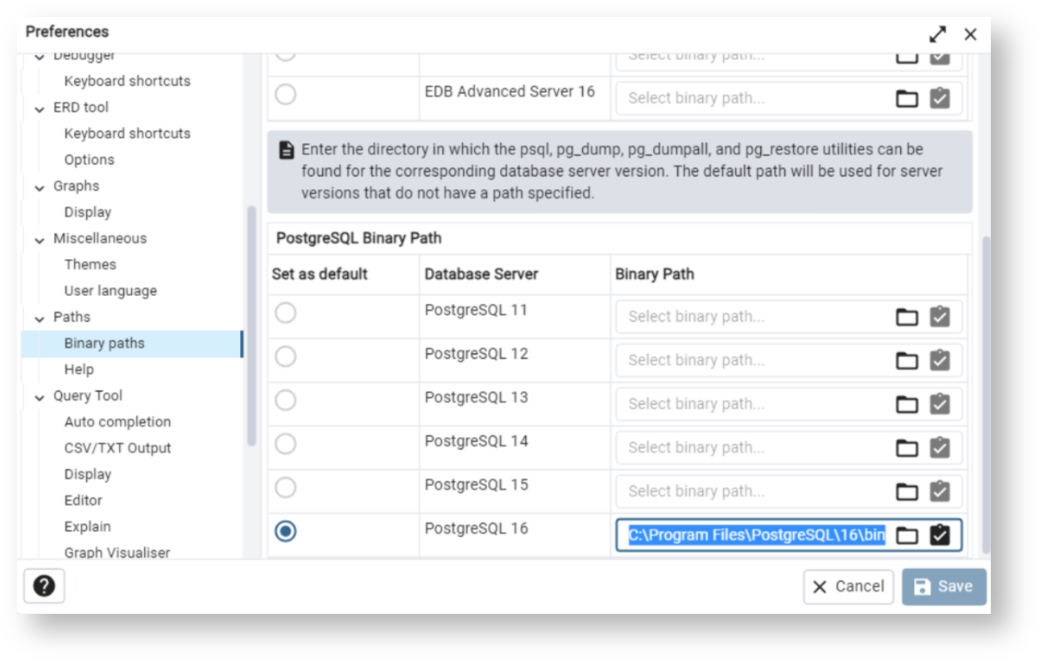
To use your backup file, all files held in C:\Program Files\PostgreSQL\16\bin must be copied into the relevant WhereScape folder: Program Files\WhereScape\RED\tools for WhereScape RED, or Program Files\WhereScape\RED\tools for WhereScape 3D.
Next:
Getting Started with WhereScape CICD Enablement Pack
...