Page History
...
To enable AI optimization tools features globally
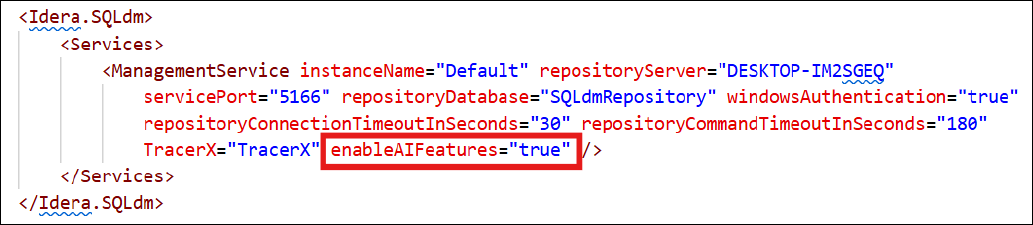
- Navigate to your SQL DM installation folder, locate the SQLdmManagementService.exe.Config file, and then open it in a text editor, such as Notepad.
- Find enableAIFeatures, and then change itfrom false to true.
Note When this feature is set to false, all AI features including buttons and the history tab are disabled for all users, overriding any subsequent user-level permissions. When set to true, AI access is then governed by the Application Security settings.
- Open Services, and then restart SQLdmManagementService.
- Open SQL DM, and then navigate to the Queries tab to verify that the AI Powered Query Optimization and AI Powered Schema & Index Optimization buttons are available and that the AI Optimization History tab is active.

To disable AI optimization tools features globally
- Repeat the same steps from the previous task, but change enableAIFeatures from true to false. Remember to restart the SQLdmManagementService for your changes to take effect.
...
Your admin must allow each user access to the AI features by managing permissions in the Application Security page.
To activate AI features on a per-user basis using Application Security
- Using an administrator account, go to Administration > Application Security.
- Click Enable Application Security
...
- , and then click Yes. All users now should have a check in the AI Access box
...
- .
- If you want to revoke access for an individual user, clear the AI Access checkbox on the row for that user account.
The AI Access checkbox already may be checked when the user is initially added to the application. In the Specify Permission page if the Add Permission Wizard, checking Grant AI Access gives the user account the AI features access when added.Note You cannot grant or revoke AI access from system administrator user accounts.
Individual user consent
Finally, each user must agree to the AI Features Terms and Conditions upon attempting to use any of the AI features within SQL DM. This dialog box appears only the first time the user attempts to use one of the AI features after they are enabled. Subsequent uses of the AI features do not require additional acceptance.
...