Page History
...
Log into the WhereScape Support Portal to access downloads.
New Features
Extensible Authentication
In this release of RED we have added a new feature enabling Extensible Authentication for Connections in RED. This feature combines connection resilience, authentication scripts and extended RED Profile attributes to create a framework for connecting to systems which require complicated client side authentication workflows not provided directly by their respective ODBC drivers and/or tools.
This feature enables working with authentication workflows such as oAuth 2.0 and Entra ID, but also allows a way to pop-out to additional authentication UI's such as for entry of Time-based One-Time Passwords for multi-factor authentication.
This feature is enabled through the following new functionalities of RED for ODBC/Database and Extensible Source Connections:
New Advanced Connect Parameters on Connections
Two new groups under Advanced Connect Parameters have been added to Connections, all of these session-level fields are in-memory only and can be persisted to your RED Profile between sessions.
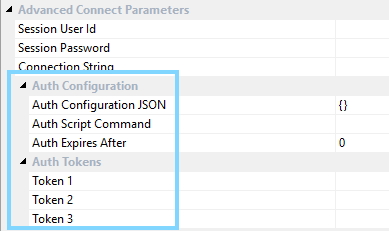
Auth Configuration
- Auth Configuration JSON - Arbitrary JSON storage of any required authentication attributes for this connection.
- Auth Script Command - When specified this command will be triggered during RED's authentication process to this connection.
- Auth Expires After - Duration in mins after which RED will reconnect at the next opportunity.
Auth Tokens
- Token (1,2,3) - Three new encrypted fields which can be used in connection strings using the token format $AUTHTKN_[1|2|3]$ for expansion at runtime. Display names can be adjusted via the RED Profile to suit a particular authentication type.
Scripted Authentication
Scripted Authentication can be enabled for a connection by providing a command line to run in the 'Auth Script Command' field. This command will be triggered by RED when it needs to authenticate with this connection for the first time and then again whenever the 'Auth Expires After' minutes has been exceeded.
When RED executes the 'Auth Script Command' this is the typical workflow:
- RED UI
- Saves the current RED Profile to disk and provide access to this Profile file and the connection name requiring authentication via environment variables.
- Runs the 'Auth Script Command'.
- Authentication Script
- Reads the RED Profile and retrieves any required Connection details from it.
- Performs the required authentication workflow for the connection.
- Updates the RED Profile on disk with refreshed Auth Tokens and other Auth Configuration values as required.
- RED UI
- Merges the updated RED Profile file back into memory.
- Completes the authentication process for the connection.
- Resets the internal expiry for the connection based on 'Auth Expires After' mins.
Authentication Environment Variables for All Scripts
The Extensible Authentication feature also enables the following new environment variables in RED Scripts, both via Azkaban and RED UI:
- WSL_[META|SRC|TGT]_AUTHCFG - contains the complete JSON structure in the 'Auth Configuration JSON' field.
- WSL_[META|SRC|TGT]_AUTHTKN_[1|2|3] - Sets of three decrypted Token values from the 'Auth Tokens' fields.
The RED Scheduler Profile table has been updated to incorporate these new fields in order to provide these values to Azkaban jobs, these can be maintained via the Scheduler Profile Maintenance script. Scripted Authentication is not supported for Azkaban in this version.
Other Improvements
Performance Improvements
- This release adds new indexes to the RED Metadata to enhance metadata query performance throughout the product.
- Improved the performance of opening object properties on large repositories.
Scheduler Improvements
...
...
Detailed Changes in RED 10.
...
7.0.0
The following changes have been implemented since 10.5.0.0
Improvements
...
6.0.0
...
Fixes
...
Detailed Changes in RED 10.6.0.1
The following changes have been implemented since 10.6.0.0
Improvements
| JIRA | Release Note |
|---|
Fixes
| JIRA | Release Note |
|---|
RED-12344
Detailed Changes in RED 10.6.0.2
The following changes have been implemented since 10.6.0.1
Improvements
...
RED-12404
...
Added Job Success and Failure command support to the RED Scheduler Plugin.
Detailed Changes in RED 10.6.0.3
The following changes have been implemented since 10.6.0.2
Improvements
...
RED-12404
...
Improved the RED Login workflow when using Scripted Authentication so that Metadata Connection attributes are refreshed via the returned profile, enabling the ability for the Auth. Script to override what was originally entered in the login screen.
Improved the syncing of the in-memory profile when changing the connection string in RED UI to avoid synchronization issues for Scripted Authentication.
...
RED-12296
...
Improved RED's encoding detection of 3D Exported XML files when loading from XML files generated by versions of 3D earlier than 9.0.6.0, after which 3D always encodes with UTF8.
...
RED-12078
...
Improved [PROCEDUREOWNER] token replacement so that it is standardized across all targets. From this release onwards only the target location settings of the object will be considered when expanding this token, DB ID set at the connection properties page level will be ignored. This change is particularly useful for Teradata and Oracle procedures.
Fixes
RED-12403
Fixed an issue with Entra ID auth on PostgreSQL where RED would crash during browse operations when any password exceeded 1024 chars.
RED-12358
| Anchor | ||||
|---|---|---|---|---|
|
...