Page History
&<img src="../resources/images/opentocr.png" title="Open Contents list" border="0"&>
You are here:
...
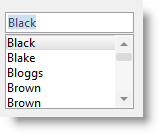
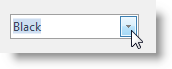
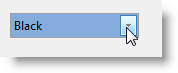
Use a combo box to present a list from which the user can select entries. A combo box consists of an edit box portion and a list portion. The ComboBoxStyle property determines the style of the combo:
Simple |
|---|

| In a simple combo box both the edit box and the list portion are shown. |
|---|---|
Drop-Down |
| In a drop-down combo box the list portion is hidden until the user clicks on the spin button. This style is useful when you want to fit a list in a small place. |
|---|---|
Drop-Down List |
| A drop-down list is otherwise the same as a drop-down, except it does not allow the user to enter data |
|---|
...
. |
...