Page History
&<img src="../resources/images/opentocr.png" title="Open Contents list" border="0"&>
You are here:Anchor
When applicable you can change the properties of the child components in the layout using the child details tab.
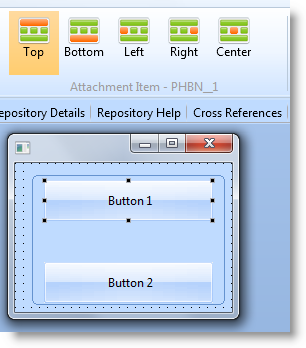
This example form contains a group box with two buttons. The group box is attached to the form with an attachment layout and the buttons are attached to the group box with another attachment layout:

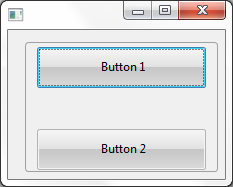
Here is the definition for the form:
     Function Options(*DIRECT)
     Begin_Com Role(*EXTENDS #PRIM_FORM) Height(187) Layoutmanager(#ATLM_1) Left(308) Top(207) Width(233)
     Define_Com Class(#PRIM_GPBX) Name(#GPBX_1) Displayposition(1) Height(150) Layoutmanager(#ATLM_2) Left(15) Parent(#COM_OWNER) Tabposition(1) Tabstop(False) Top(5) Width(205)
     Define_Com Class(#PRIM_PHBN) Name(#PHBN_1) Caption('Button 1') Displayposition(1) Height(41) Left(14) Parent(#GPBX_1) Tabposition(1) Top(8) Width(177)
     Define_Com Class(#PRIM_PHBN) Name(#PHBN_2) Caption('Button 2') Displayposition(2) Height(41) Left(14) Parent(#GPBX_1) Tabposition(2) Top(105) Width(177)
     Define_Com Class(#PRIM_ATLM) Name(#ATLM_1) Marginbottom(5) Marginleft(5) Marginright(5) Margintop(5)
     Define_Com Class(#PRIM_ATLI) Name(#ATLI_1) Attachment(Center) Manage(#GPBX_1) Marginleft(10) Parent(#ATLM_1)
     Define_Com Class(#PRIM_ATLM) Name(#ATLM_2) Marginleft(10) Marginright(10)
     Define_Com Class(#PRIM_ATLI) Name(#ATLI_5) Attachment(Top) Manage(#PHBN_1) Parent(#ATLM_2)
     Define_Com Class(#PRIM_ATLI) Name(#ATLI_6) Attachment(Bottom) Manage(#PHBN_2) Parent(#ATLM_2)
     End_Com
You can see in the ribbon that the first button is attached to the top of the layout and the second button is attached to the bottom of it:
&<img src="../resources/images/opentoc-dark.png" title="Open Contents List" border="0"&>