Page History
...
The exercises create a web service called GetEmployees.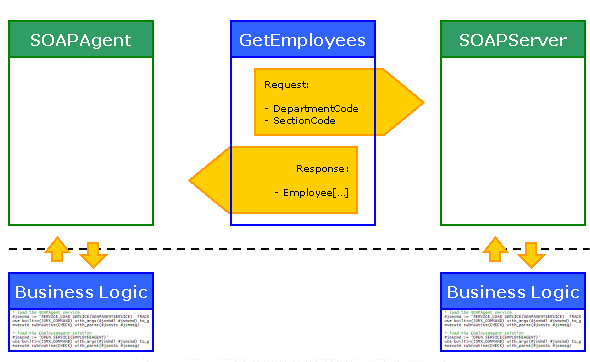
The SOAP Agent, or client, consuming the GetEmployees web service will pass a department and section to the server.
A list of employees for that department and section will be returned by the publisher, the SOAP Server, as an array.
If only a department is passed, a list of employees in all sections for that department will be returned.
If no department and section is provided, then all employees for the company will be returned.
The following summarizes the steps you will follow in the three exercises to build and test your SOAP Service:
INT009A – SOAP Service – Define Server
A form accepts department and section code and runs the IIIEMPLOYEEAGENT service on the server
Sets IIIEMPLOYEEAGENT operation to GETEMPLOYEES
Sets parameters to program variables
CALLs the service
Web Server invokes JSMDIRECT which runs the function implementing IIIEMPLOYEESERVER
Form receives employees list and populates list view to display results.
Define SOAP Server Types – the variables to be handled by this service
Create a SOAP Server solution using the SOAP Server Wizard.
Map parameters to program variables
Build the solution, creates WSDL and jar file for iiiEmployeeServer.
The WSDL defines the GetEmployees SOAP service
Use the generated RDMLX to create function which supports the iiiEmployeeServer service and add your business logic
Register the function as a JSMDIRECT service.
INT009B – SOAP Service – Define Agent
Create a new solution using the SOAP Agent Wizard
Define the SOAP Agent iiiEmployeeAgent based on the WSDL created in INT009A
Map parameters to program variables
Build the solution creates a jar file, properties file and sample RDMLX
Create the form iiiFRM04 based on the generated RDMLX and add your business logic.
INT009C – SOAP Service – Test
The form accepts department and section code and runs the IIIEMPLOYEEAGENT service on the server
Sets IIIEMPLOYEEAGENT operation to GETEMPLOYEES
Sets parameters to program variables
CALLs the service
Web Server invokes JSMDIRECT which runs the function implementing IIIEMPLOYEESERVER
Form receives employees list and populates list view to display results.
To achieve this objective you must perform these steps in this sequence: