Page History
[  |../../index.htm#lansa/wamengb2_0045.htm]
You are here:
...
The checkbox weblet provides a checkbox control. It broadly corresponds to the <input type="checkbox"> HTML element.
A checkbox control is typically used to represent a value that can have one of two states. For example: on or off; yes or no; selected or unselected.
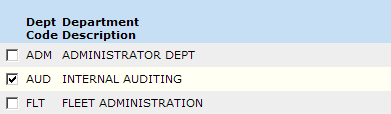
When used in a list (with no caption), the checkbox weblet looks like this:
...
| Info |
|---|
| Note: While the checkbox weblet includes properties such as on_click_wrname that allow it to navigate to another webroutine when clicked, It is not good user-interface design practice to initiate actions from the click of a checkbox. Devices such as a push button, menu item or anchor (hyperlink) should be used to accomplish this. |
[ |../../index.htm#lansa/wamengb2_0045.htm]