Page History
[  |../../index.htm#lansa/usrtut01_0175.htm]
You are here:
...
In this step, you will view the Favorites tab. The Favorites tab always contains the Last Opened tab. The Favorites tab can also contain any other tab which you add to Favorites.
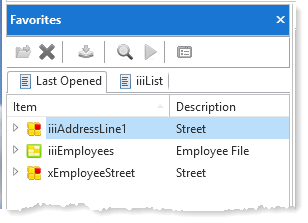
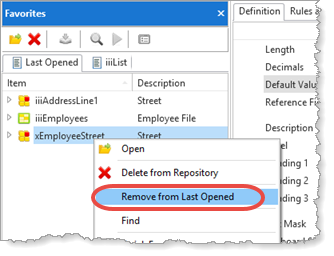
1. To remove objects from Last Opened list, select them on the Favorites tab and use the right mouse menu.
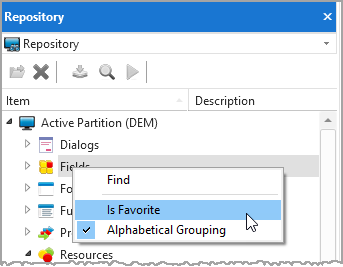
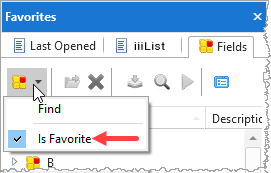
2. In this step, you will add a list to your Favorites tabyour Favorites tab. Switch to the Repository tabthe Repository tab. Select the Fields list and use the right mouse menu option Is Favoriteoption Is Favorite:
3. Switch to the Favorites tab. The Fields list is now shown on the Favorites tab.
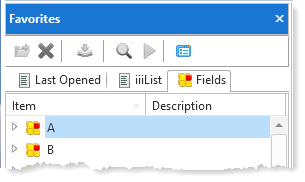
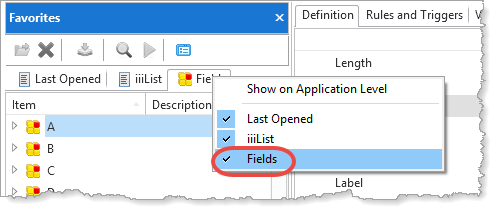
4. To remove the Fields from the Favorites tab, position your mouse over the Fields tab, left mouse click and deselect Is FavouriteFavorite.
To clear them all in one go, select them all using the Shift Key + left mouse, clicking on first then last.
Often you will create Editor Lists of objects you want to work with and make these lists favorites.
[ |../../index.htm#lansa/usrtut01_0175.htm]