Page History
[  |../../index.htm#lansa/repeng01_0080.htm]
You are here:
...
In this step, you will review the field visualization created for the iiiSalary field and will add a spin edit box, making this the default visualization for the field.
| Info |
|---|
| Numeric fields can be visualized as simple entry fields, spin edit boxes, progress bars or track bars. |
1. Open the iiiSalary field in the Editor.
2. Select the Visualization tab.
You will notice that the standard visualization for a numeric field is simply an entry field.
3. Click the SpinEdit toolbar  toolbar button to add a spin edit visualization. The Spin Edit box allows the end-user to adjust the numbers using the spin buttons or by using the Up and Down keys.
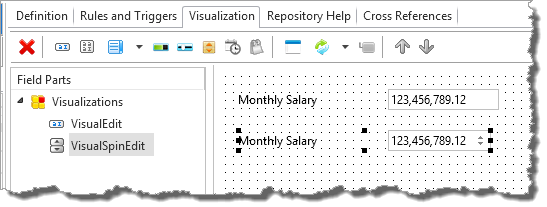
4. Change the DefaultVisual property of the VisualSpinEdit component to True:.
5. Save and close the field.
[ |../../index.htm#lansa/repeng01_0080.htm]