Page History
[  |../../index.htm#lansa/repeng01_0075.htm]
You are here:
...
In this step, you will execute the Department Maintenance form and add data to the Department table.
1. Execute thee the iiiMaintDepartments form by clicking Runtime / Execute on the Home ribbon.
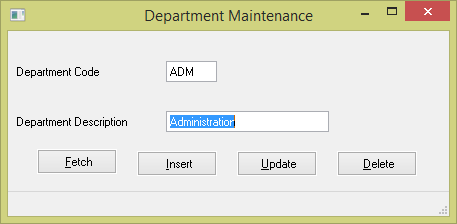
2. Insert the following data into the table:
Department | Description |
|---|---|
ADM | Administration |
LGL | Legal |
MRK | Marketing |
TRN | Company Training |
TRV | Business Travel |
...
| Note |
|---|
...
| Note: If you try to Insert or Save with a blank Department Description, the field Department Code will be highlighted due to a validation error caused by the field level validation rules created in REP003 - Validation Rules. |
3. Close the form.
4. Close the form in the Editor.
[ |../../index.htm#lansa/repeng01_0075.htm]