Page History
[  |../../index.htm#lansa/reptut01_0460.htm]
You are here:
...
In this step, you will add a calculation type virtual column to the Department table based on the salary data in the Employee table.
1. Open the table iiiDepartments in the Editor.
2. Ensure that the Table Columns tab and the Details tab are visible. Notice that no PJCs have been defined.
3. Select the Access Routes tab to add your new predetermined join columns.
4. Select the iiiTOEMP access route. Click the Add button on the Home ribbon and select Add PJC from the drop-down list.
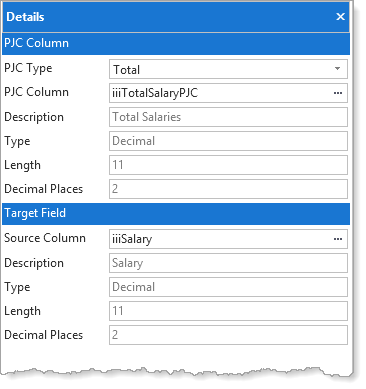
5. In the Details tab, enter the following characteristics:
PJF field | iiiTotalSalaryPJC |
PJF Type | Total |
Source field | iiiSalary |
|
Use the ellipsis and Find dialog to select the fields. Your
Your Details tab will now look like this:
6. Compile the table, to recreate the OAM only. As noted earlier, this module implements all validation, virtual column, and PJC logic for the table.
7. Close the table in the editor.
[ |../../index.htm#lansa/reptut01_0460.htm]