Page History
[  |../../index.htm#lansa/frmeng01_0250.htm]
You are here:
...
In this step, you will once again use the UPDATE.Click event routine and set a breakpoint on the first IF_STATUS command, with a break on value setting for variable IO$STS. This is a 2 character I/O status, returned by the UPDATE command. When a validation error occurs, it will contain 'VE'.
1. Set a breakpoint on the first IF_STATUS command.
2. Run the form in debug mode. When the editor is displayed at the CreateInstance routine, scroll down to the UPDATE.Click event routine and set a break point on the first IF_STATUS command.
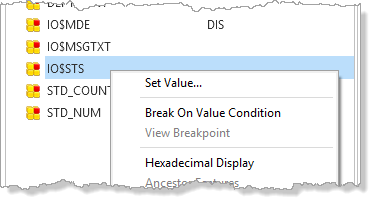
3. In the variables tab, select the IO$STS variable and use the right mouse menu to Break on Value Condition.
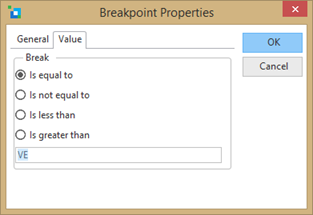
4. In the Breakpoint Properties dialog, select the Value tab and set the breakpoint to break when IO$STS is equal to 'VE'
5. Select OK and press F5 to run the form.
6. Fetch a department and press Update. Debug should not break because IO$STS is not equal 'VE'
7. Fetch a department and clear the department description field, and press Update. Debug should now break on the IF_STATUS command.
8. Close your form and close it in the editor. You have completed this exercise.
[ |../../index.htm#lansa/frmeng01_0250.htm]