Page History
[  |../../index.htm#lansa/wbfeng01_0110.htm]
You are here:
...
1. Select the Source tab. Notice that your web page has four event handling routines:
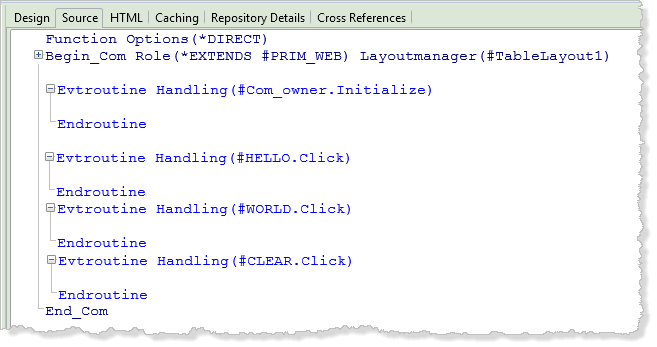
The The Initialize event was created when you created the web page.
2. Complete the HELLO.Click event by adding an ASSIGN statement to extend the current value of STD_TEXT by adding the text 'Hello' to it. Your code should look like the following:
Evtroutine Handling(#HELLO.Click) #STD_TEXT := #STD_TEXT + 'Hello ' Endroutine
The The AutoComplete prompter will show up as you type. You can use it to select the command and parameter values.
Notice there is a space between the word Hello and the closing quote.
Some Things to Note about Editing Code
- The editor is completely free format. The syntax will be checked as you enter the command. A red triangle beside a command indicates that a warning or error message can be displayed. To display the message, click on the red triangle.
- You can only enter one command per line.
- Your commands and their parameters can be in uppercase or lowercase.
- The definitions of the components (i.e., buttons, fields, and so on) on your form are written at the start of your program as a series of DEFINE_COM (Define Component) commands. These commands can be hidden or displayed using the plus sign in front of them or using the editor settings.
- Normally, you will change the DEFINE_COM commands only by using the Details tab. You can of course, directly edit the DEFINE_COM statements, but we recommend you avoid this in this workshop.
...
- .
...