Page History
To execute the Processing Sequence you must run the function DXP1RUN in process DXCONTROL and provide the path to the run control file in the UDEF= argument.
On Windows servers, you run function DXP1RUN by executing x_run.exe with the necessary arguments to specify process, function, partition, and language, the UDEF= argument, and any other arguments required to specify database and authorisation details. A sample command looks like this:
| Panel | ||
|---|---|---|
| ||
"C:\PROGRAM |
...
FILES\LANSA |
...
Composer\X_WIN95\X_LANSA\execute\x_run.exe" |
...
PROC=DXCONTROL |
...
FUNC=DXP1RUN |
...
UDEF=<run_control_file> |
...
LANG=ENG |
...
PART=LIC |
...
USER=PCXUSER |
...
PSPW=<password> |
...
DBUS=<database |
...
user> |
...
PSWD=<database |
...
password> |
...
DBID=<database |
...
name> |
...
DBUT=<database |
...
type> |
LANSA Composer provides a skeletal command on the Run commands tab. You can click the Copy button to copy the command to the clipboard:

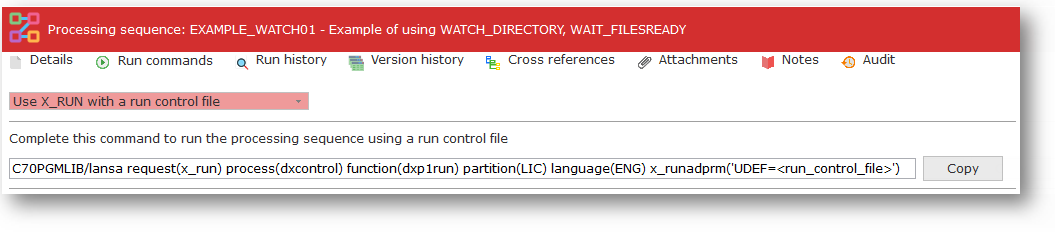
On IBM i servers, you run function DXP1RUN by executing the LANSA command with the process, function, partition and language parameters. You specify the UDEF= argument, with the path to the run control file, in the x_runadprm parameter. A sample command looks like this:
| Panel | ||
|---|---|---|
| ||
| LICPGMLIB/lansa |
...
| request(x_run) |
...
| process(dxcontrol) |
...
| function(dxp1run) |
...
| partition(LIC) |
...
| language(ENG) |
...
| x_runadprm('UDEF=<run_control_file>') |
Again LANSA Composer provides a skeletal command on the Run commands tab. You can click the Copy button to copy the command to the clipboard:
Refer to LANSA documentation for the details of the arguments to x_run.exe or the parameters for the LANSA command.