Page History
...
With your project open in Studio, expand the folder Solutions / SendCVSFile. Select and right click the file SendCVSFile.lih. Select Copy File.
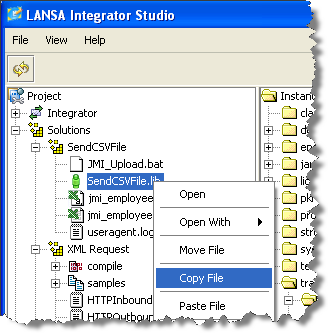
2. Expand your XML Request solution, Select XML Request, right click and select Paste File. Click OK to confirm. The SendCVSFile.lih file will be copied to your XML Request folder. Select the file and right click to Rename File. Change the file name to iiiPRO04_client_test.lih.
3. You need to modify the User Agent file to connect to the server and service you have created. Right-click on iiiPRO04_client_test.lih and select Open With / Properties Editor. Make the following replacements:
Old Line | New Line |
|---|---|
name=iiiFN03_SERVICE | name=iiiFN04_SERVICE |
xml.uri=/cgi-bin/jsmdirect?orderxml | xml.uri=/cgi-bin/jsmdirect?iiiFN04_SERVICE |
If you are using a local web server and JSM server the uri line will be:
xml.uri=/cgi-bin/jsmdirect.exe?iiiFN04_SERVICE
4. You have completed the creation of your User Agent host configuration file. Save and close
iiiPRO04_client_test.lih.