Page History
[  |../../index.htm#lansa/l4wdev03_0275.htm]
現在地:
...
フィールド名
EMPNO
説明
フィールドをフォーム上にプロンプタつき編集ボックスとして表示します。
標準的な編集ボックスに、プロンプタを添えて表示することができます。まず、プロンプタを作成します。プロンプタ・フォームは次の条件を満たさなければなりません。
- デフォルトのプロパティが設定されていること
- (OKボタンを押すなどにより)画面を閉じたとき、Modalresult(ok)を返すような仕組みがあること
サンプルの作成方法
- EMPNOPRMTというフォームを作成し、下記に示す、プロンプタのコードを貼り付けてください。
- コンポーネント・エディターでEMPNOフィールドを開き、下記に示す、フィールドのコードを貼り付けてください。
- フォームを作成し、下記に示す、フォームのコードをコピーしてください。これをコンパイル、実行します。
動作
作成したプロンプタ・フォームはガイドラインに従っていなければなりません。以下のようにフォームにプロパティを追加し、これをフォームの省略時プロパティとしてください(例:Defaultpty(p_Employee_number))。
Define_
...
Pty Name(p_Employee_number)
...
Get(*
...
auto #empno) Set(set_empno)
ユーザーが (F4キーやの省略記号 (...) ボタンを押して) プロンプタを起動した時、このプロパティ一式が呼び出されます。呼び出されると、プロパティにはフィールドの現在値が設定されます。これを利用すると、実際にプロンプタ・フォームを表示する前に、正しい社員が選択されているかどうか確認することができます。
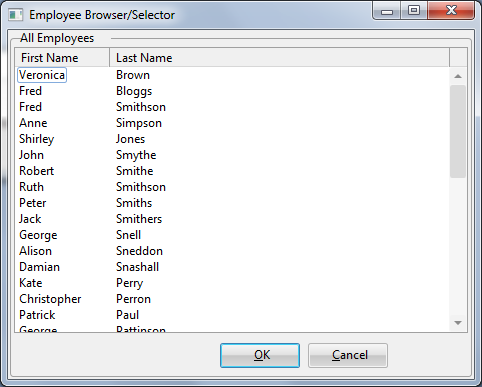
応答を要求するフォームが表示されます。ここで新しい社員を選択してOKボタンを押すと、フォームは画面から消えます。その後、OKボタンのハンドラーが、フォームのModalresultをokと設定します(Modalresult(ok))。これはフィールドに対して、処理が正常に終了し、新しい社員が選択された旨を通知するものです。逆にModalresultが未設定であれば、ユーザーがキャンセルしたため、新しい値に対する処理は必要ないことを表します。
最後に、省略値プロパティを参照してプロンプタの値を調べ、新しい値になるよう表示を更新します。
プロンプタのソース
...
Function Options(*DIRECT)
...
Begin_
...
Com Role(*
...
EXTENDS #PRIM_FORM)
...
Defaultpty(p_Employee_number)
...
Clientheight(463)
...
Clientwidth(656)
...
Formstyle(Owned)
...
Height(490)
...
Layoutmanager(#LAYOUT2)
...
Left(330)
...
Popupmenu(#PMNU_1)
...
Top(127)
...
Width(664)
...
Define_
...
Com Class(#PRIM_GPBX)
...
Name(#GPBX_2)
...
Caption('
...
All Employees ')
...
Displayposition(1)
...
Height(463)
...
Layoutmanager(#LAYOUT1)
...
Left(0)
...
Parent(#COM_OWNER)
...
Popupmenu(#PMNU_1)
...
Tabposition(1)
...
Tabstop(False)
...
Top(0)
...
 Width(656)
     Define_
...
Com Class(#PRIM_LTVW)
...
Name(#LISTVIEW)
...
Displayposition(1)
...
Height(402)
...
Left(6)
...
Parent(#GPBX_2)
...
Popupmenu(#PMNU_1)
...
Tabposition(1)
...
Top(15)
...
 Width(644)
     Define_
...
Com Class(#PRIM_LVCL)
...
Name(#LVCL_1)
...
Caption('
...
First Name')
...
Captiontype(Caption)
...
Displayposition(1)
...
Parent(#LISTVIEW)
...
Sortonclick(True)
...
Source(#GIVENAME)
...
 Width(35)
     Define_
...
Com Class(#PRIM_LVCL)
...
Name(#LVCL_2)
...
Caption('
...
Last Name ')
...
Captiontype(Caption)
...
Displayposition(2)
...
Parent(#LISTVIEW)
...
Sortonclick(True)
...
Source(#SURNAME)
...
Width(50)
...
 Widthtype(Remainder)
     Define_
...
Com Class(#PRIM_LVCL)
...
Name(#LVCL_3)
...
Parent(#LISTVIEW)
...
Source(#EMPNO)
...
Visible(False)
...
Width(20)
...
Define_
...
Com Class(#PRIM_ATLM)
...
 Name(#LAYOUT1)
     Define_
...
Com Class(#PRIM_ATLI)
...
Name(#IL301)
...
Attachment(Center)
...
Manage(#LISTVIEW)
...
Marginbottom(2)
...
Marginleft(2)
...
Marginright(2)
...
Margintop(2)
...
Parent(#LAYOUT1)
...
Define_
...
Com Class(#PRIM_SPLM)
...
Name(#LAYOUT2)
...
 Orientation(Vertical)
     Define_
...
Com Class(#PRIM_SPLI)
...
Name(#IS102)
...
Manage(#GPBX_2)
...
Parent(#LAYOUT2)
...
Weight(1)
...
Define_
...
Com Class(#PRIM_PMNU)
...
 Name(#PMNU_1)
     Define_
...
Com Class(#PRIM_MITM)
...
Name(#HSPLIT)
...
Caption('
...
Split Form Horizontally')
...
Displayposition(1)
...
 Parent(#PMNU_1)
     Define_
...
Com Class(#PRIM_MITM)
...
Name(#VSPLIT)
...
Caption('
...
Split Form Vertically')
...
Displayposition(2)
...
Enabled(False)
...
 Parent(#PMNU_1)
     Define_
...
Com Class(#PRIM_PANL)
...
Name(#PANL_1)
...
Displayposition(2)
...
Height(40)
...
Left(4)
...
Parent(#GPBX_2)
...
Tabposition(2)
...
Tabstop(False)
...
Top(419)
...
 Width(648)
     Define_
...
Com Class(#PRIM_ATLI)
...
Name(#ATLI_1)
...
Attachment(Bottom)
...
Manage(#PANL_1)
...
 Parent(#LAYOUT1)
     Define_
...
Com Class(#PRIM_PHBN)
...
Name(#PB_OK)
...
Buttondefault(True)
...
Caption('&OK')
...
Displayposition(1)
...
Left(208)
...
Parent(#PANL_1)
...
Tabposition(1)
...
 Top(8)
     Define_
...
Com Class(#PRIM_PHBN)
...
Name(#PHBN_2)
...
Buttoncancel(True)
...
Caption('&Cancel')
...
Displayposition(2)
...
Left(296)
...
Parent(#PANL_1)
...
Tabposition(2)
...
Top(8)
...
Group_
...
By Name(#TREEITEMS)
...
 Fields(#DEPTMENT #DEPTDESC #SECTION #SECDESC #EMPNO #FULLNAME)
     Define_Pty Name(p_Employee_number)
...
Get(*
...
auto #empno) Set(set_empno)
...
     Ptyroutine Name(set_empno)
     Define_
...
Map For(*input)
...
Class(#empno)
...
Name(#employee)
...
Selectlist Named(#LISTVIEW)
...
Continue If('
...
#Employee *ne #empno')
     Set Com(#listview.currentitem)
...
Focus(true)
...
Selected(true)
...
     Endselect
     Endroutine
     Evtroutine Handling(#com_owner.CreateInstance)
...
Set Com(#com_owner)
...
Caption('
...
Employee Browser/Selector')
...
* Change Field(#TREEITEMS)
...
To(*NULL)
...
* Select Fields(#DEPTMENT #SECTION #EMPNO #SURNAME #GIVENAME) From_File(PSLMST)
...
Select Fields(#LISTVIEW)
...
From_File(PSLMST)
...
Fetch Fields(#DEPTDESC)
...
From_File(DEPTAB)
...
With_Key(#DEPTMENT)
...
Keep_Last(50)
...
Fetch Fields(#SECDESC)
...
From_File(SECTAB)
...
With_Key(
...
#DEPTMENT #SECTION) Keep_Last(50)
...
Use Builtin(BCONCAT)
...
With_Args(
...
#GIVENAME #SURNAME) To_Get(#FULLNAME)
...
Add_
...
Entry To_List(#LISTVIEW)
...
Set Com(#ListView.currentitem)
...
Image(#vi_employ)
...
     Endselect
     Endroutine
     Evtroutine Handling(#VSPLIT.Click)
...
Set Com(#layout2)
...
Orientation(vertical)
...
Set Com(#VSplit)
...
Enabled(False)
...
Set Com(#HSplit)
...
Enabled(True)
...
     Endroutine
     Evtroutine Handling(#HSPLIT.Click)
...
Set Com(#layout2)
...
Orientation(horizontal)
...
Set Com(#HSplit)
...
Enabled(False)
...
Set Com(#VSplit)
...
Enabled(True)
...
     Endroutine
     Evtroutine Handling(#PB_OK.Click)
...
Invoke Method(#COM_OWNER.CLOSEFORM)
...
Set Com(#com_owner)
...
Modalresult(ok)
...
     Endroutine
     End_Com
...
フィールドのソース
Begin_
...
Com Role(*
...
EXTENDS #PRIM_OBJT)
...
Begin_
...
Com Role(*
...
Visual #PRIM_EVEF)
...
Name(#ENTRYFIELD)
...
Defaultvisual(True)
...
Height(19)
...
Usepicklist(False)
...
Width(209)
...
End_Com
...
Begin_
...
Com Role(*
...
prompter #EMPNOPRMT) Name(#PROMPTER)
...
Defaultprompter(True)
...
End_Com
...
End_Com
...
フォームのソース
...
Function Options(*DIRECT)
...
Begin_
...
Com Role(*
...
EXTENDS #PRIM_FORM)
...
Clientheight(108)
...
Clientwidth(492)
...
Height(135)
...
Left(304)
...
Top(155)
...
Define_
...
Com Class(#EMPNO.Visual)
...
Name(#EMPNO)
...
Displayposition(1)
...
Left(72)
...
Parent(#COM_OWNER)
...
Showprompter(True)
...
Tabposition(1)
...
Top(32)
...
Usepicklist(False)
...
Width(299)
...
End_Com
...
外観
外観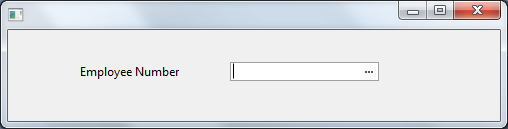
| Note |
|---|
注:
|
...
|
...
|
...
|
...