Page History
unmigrated-wiki-markup次のソースを使用して、FLDVIS01という名前の再利用可能パーツを作成します。これにより、フィールドDEPTMENTにオートコンプリート機能が実現します。 [
...
...
...
...
 Function Options(*DIRECT)
     Begin_
...
Com Role(*
...
EXTENDS #PRIM_PANL *implements #Prim_dc.iMonitorSubject)
...
Defaultpty(Value)
...
Displayposition(1)
...
Height(20)
...
Layoutmanager(#ATLM_1)
...
Left(0)
...
Tabposition(1)
...
Top(0)
...
Width(150)
...
Define_
...
Com Class(#PRIM_ATLM)
...
 Name(#ATLM_1)
     Define_
...
Com Class(#DEPTMENT.VisualEdit)
...
Name(#Department)
...
Displayposition(1)
...
Height(20)
...
Marginleft(0)
...
Parent(#COM_OWNER)
...
Tabposition(1)
...
 Width(150)
     Define_
...
Com Class(#PRIM_ATLI)
...
Name(#ATLI_1)
...
Attachment(Center)
...
Manage(#Department)
...
Parent(#ATLM_1)
...
Define_
...
Pty Name(Value)
...
Get(GetPropertyValue)
...
Set(SetPropertyValue)
...
Ptyroutine
...
Name(GetPropertyValue)
     Define_
...
Map For(*Output)
...
Class(#prim_alph)
...
Name(#Property)
...
     #Property := #Department
     Endroutine
     Ptyroutine Name(SetPropertyValue)
     Define_Map For(*Input)
...
Class(#prim_alph)
...
Name(#Property)
...
     #Department := #Property
     Endroutine
     Mthroutine Name(ApplymonitoredValue) Options(*redefine)
...
*...
 No redefinition required
     Endroutine
     Mthroutine Name(GetValue) Options(*redefine)
...
*
...
 No redefinition required
     Endroutine
     Evtroutine Handling(#Department.KeyPress)
...
Handled(#Handled)
...
Keycode (#KeyCode)
...
Char (#Char)
...
*
...
 If the field isn't full
     If (#Department.
...
CurSize <> #Department.FieldLength)
...
*
...
 If a character entered
     If (#KeyCode = isChar)
     #Com_Owner.PrepareAutoComplete
...
If (#Com_owner.CanAutoComplete)
...
     #Handled := True
     #Com_owner.AutoComplete(
...
 #Char )
     Signal Event(ValueChanged)
...
Endif
...
Endif
...
Endif
...
Endroutine
...
Evtroutine Handling(#Department.Changed)
...
    * Handle all other key presses that might affect the value
     Signal Event(ValueChanged)
...
Endroutine
...
Mthroutine Name(CanAutoComplete)
...
Help('
...
Can we autocomplete?') Access(*Private)
     Define_
...
Map For(*Result)
...
Class(#prim_boln)
...
Name(#Result)
...
*...
 If selection doesn't start at the end of the value, autocomplete is not appropriate.
     #Result := (#Department.SelectionEnd = (#Department.Trim.
...
cursize +
...
1))
...
Endroutine
...
Mthroutine
...
Name(AutoComplete)
...
 Access(*private)
     Define_
...
Map For(*Input)
...
Class(#prim_alph)
...
Name(#Char)
...
Help('
...
Character just pressed on the keyboard')
...
Define_
...
Com Class(#prim_nmbr)
...
 Name(#Start)
     Define_
...
Com Class(#prim_alph)
...
Name(#Candidate)
...
#Start
...
:=...
#Department.SelectionStart
...
#Candidate :=
...
#Com_owner.PrepareCandidate(
...
 #Char )
     #Department := #Com_owner.GetCandidate(
...
#Candidate )
...
*
...
 Set selection to be startposition + 1 to the end
     #Department.
...
SelectionStart :=
...
 #Start + 1
     #Department.
...
SelectionEnd :=
...
#Department.Trim.
...
cursize + 1
     Endroutine
     Mthroutine Name(PrepareAutoComplete) Help('Prepare Selection in the value so that it runs left to right') Access(*private)
     Define_Com Class(#prim_nmbr)
...
Name(#Transition)
...
*
...
 If Start is greater than end, reverse the selection points
     If (#Department.SelectionStart > #Department.SelectionEnd)
...
#Transition
...
:=...
#Department.SelectionStart
...
#Department....
SelectionStart :=
...
#Department.SelectionEnd
...
#Department.
...
SelectionEnd :=
...
 #Transition
     Endif
...
Endroutine
...
Mthroutine Name(PrepareCandidate)
...
 Help('Prepare the input value ready for looking up the next candidate') Access(*private)
     Define_
...
Map For(*Input)
...
Class(#prim_alph)
...
Name(#Char)
...
Help('
...
Character just pressed on the keyboard')
     Define_
...
Map For(*Result)
...
Class(#Prim_alph)
...
Name(#Result)
...
*
...
 If selection is the whole word, only use the char supplied by the event
     If (#Department.
...
SelectionStart =
...
 1)
     #Result := #Char.uppercase
     Else
     * Get anything to the left of the cursor start position and append the last key press
     #Result := (#Department.substring(
...
1 (#Department.
...
SelectionStart -
...
1)
...
).
...
trim +
...
#Char).Uppercase
...
Endif
...
Endroutine
...
Mthroutine Name(GetCandidate)
...
 Access(*private)
     Define_
...
Map For(*Input)
...
Class(#prim_alph)
...
 Name(#Candidate)
     Define_
...
Map For(*Result)
...
Class(#prim_alph)
...
Name(#Result)
...
*
...
 If no record found, the last value entered is still the right answer
     #Result := #Candidate
     * Find the first record starting with the candidate value
     Select Fields(#Deptment) From_File(Deptab)
...
With_Key(#Candidate)
...
Generic(*yes)
...
     #Result := #Deptment
     Leave
     Endselect
     Endroutine
     End_Com
再利用可能なパーツが、DEPTMENTに対して単一の入力ボックスしか表示していないことに注意してください。ラベルや説明は必要ありません。
フィールドDEPTMENTを開き、[ビジュアライゼーション]タブに移動します。
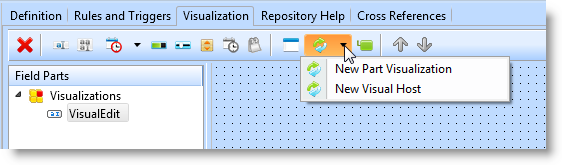
[新しいビジュアルホスト]のオプションを選択し、プロンプトでFLDVIS01を選択します。DEPTMENTは、以下のようになります。
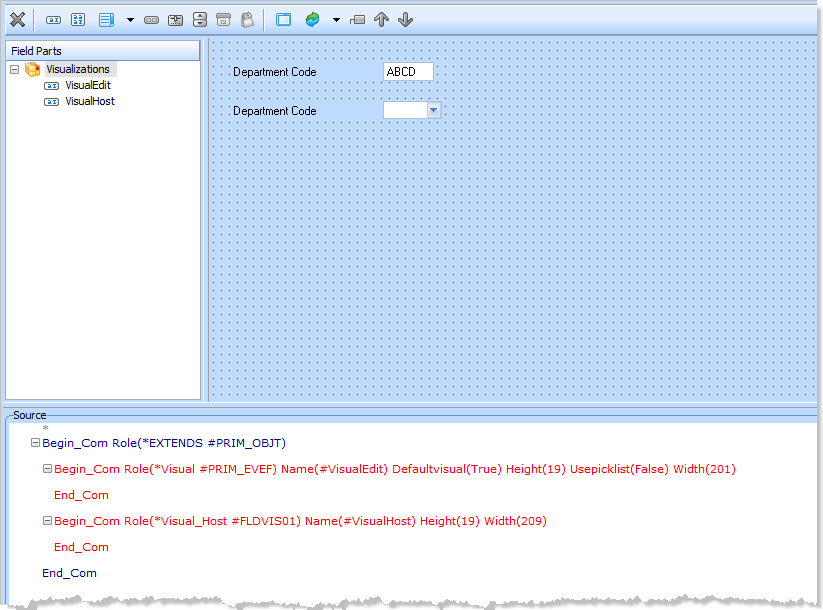
これで、新しいVisual_host再利用可能パーツを次のように使用できます。
Define_Com Class(#Deptment.Visualhost) Name(#...)
...
VisualHostの省略時の名前をAutoCompleteのような名前にしてもかまいません。そうすると、フォームで使用した場合に次のように表示されます。
Define_Com Class(#Deptment.AutoComplete)
...
Name(#...)
...