Page History
[  |../../index.htm#lansa/l4wdev06_1035.htm]
現在地:
...
このサンプル・フォームでは、社員のコレクションを作成し、コレクションにアイテムを追加する方法を説明します。この例では、コレクションは配列のように単純に使用されます。
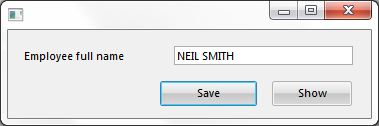
社員の名前を入力し、保存ボタンをクリックすると、社員名がコレクションに保存されます。
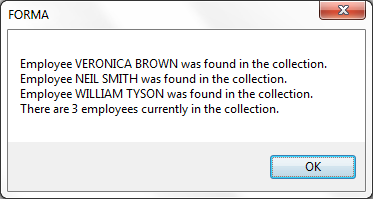
表示ボタンをクリックすると、コレクションに入力されたすべての社員がメッセージ・ボックスに表示されます。
アプリケーションが終了すると、コレクションのエントリーはクリアされます。
コレクションの定義
社員名を保存するコレクションは、以下のように定義されます。
Define_
...
Com Class(#Prim_
...
kCol<#FullName #Std_Num>)
...
Name(#Employee)
...
#FullName値は、#FullNameフィールドを含むコレクションを示します。
...
#STD_
...
NUMパラメータは、コレクションのキーとして使用されるこのリポジトリのフィールドを指定します(パック数字(7,0))。
...
コレクションの名前Nameは、#Employeeです。
コレクションへのアイテムの追加
社員の名前全体をコレクションに保存するコードは、保存ボタンのClickイベントに置かれます。
Change Field
Change Field(#LISTCOUNT)
...
To('#Employee.
...
ItemCount +
...
1')
...
Set Com(#Employee<#ListCount>)
...
Value(#FullName.Value)
...
上の例では、以下のことに注意してください。
コレクションのプロパティItemCount(コレクション内のアイテムの数)は、次の使用可能なキーの計算に使用されます。
コレクション内のアイテムを操作する場合は、コレクションの名前とキー・フィールド#Employee<#ListCount>で参照します。
コレクション内のアイテムを作成するには、単に値を設定します。
...
コレクション・アイテムの操作
Wiki Markup
\[表示\]ボタンのClickイベントは、各社員の#FullNameの値をメッセージ・ボックスに取得するFor/EndForループを使用して、コレクション内の各エントリーの参照を繰り返します。 For Each
For Each(#EmployeeFullName)
...
In(#Employee)
...
Use Builtin(MESSAGE_BOX_ADD)
...
With_Args('Employee'
...
#EMPLOYEEFULLNAME.
...
VALUE 'was found in the collection.')
     Endfor
...
コレクションの例1のソース・コード
...
コレクションの作成方法を見るには、このソースをコピーしてフォームに貼り付け、フォームをコンパイルして実行してください。
     Function Options(*DIRECT)
     Begin_
...
Com Role(*
...
EXTENDS #PRIM_FORM)
...
Clientheight(88)
...
Clientwidth(363)
...
Height(115)
...
Left(269)
...
Top(185)
...
Visualstyle(#VS_NORM)
...
Width(371)
...
*...
Using a Keyed Collection (PRIM_KCOL)
...
 as a simple array.
     * Define the keyed collection to be used to store employee names.
     * The collection is named #Employee and it collects #FullNames.
     * It is indexed (or more correctly, keyed by) #Std_Num ie: a packed (7,0)
...
 number.
     Define_
...
Com Class(#Prim_
...
kCol<#FullName #Std_Num>)
...
Name(#Employee)
...
*...
 Define the form.
     * #FULLNAME allows employee names to be input.
     Button #PHBN_SAVE saves employee names into the collection.
     * Button #PHBN_SHOW shows the details of all the employees in the collection.
     Define_Com Class(#FULLNAME.Visual)
...
Name(#FULLNAME)
...
Displayposition(1)
...
Height(19)
...
Left(16)
...
Parent(#COM_OWNER)
...
Tabposition(1)
...
Top(16)
...
 Width(329)
     Define_
...
Com Class(#PRIM_PHBN)
...
Name(#PHBN_SAVE)
...
Buttondefault(True)
...
Caption('
...
Save ')
...
Displayposition(2)
...
Left(152)
...
Parent(#COM_OWNER)
...
Tabposition(2)
...
Top(51)
...
 Width(97)
     Define_
...
Com Class(#PRIM_PHBN)
...
Name(#PHBN_SHOW)
...
Caption('
...
Show ')
...
Displayposition(3)
...
Left(264)
...
Parent(#COM_OWNER)
...
Tabposition(3)
...
Top(51)
...
*
...
 -------------------------------------------------------------------------
     *
...
#PHBN_SAVE.
...
Click : Save the detail on an employee in the keyed collection
     * -------------------------------------------------------------------------
...
Evtroutine Handling(#PHBN_SAVE.Click)
...
*...
 Save the employee's full name into the keyed collection in the next slot.
     * Use the keyed collection property ItemCount to compute the next slot
     Change Field(#LISTCOUNT) To('#Employee.ItemCount + 1')
     Set Com(#Employee<#ListCount>) Value(#FullName.Value)
...
    * Clear the full name field ready for input of the next name
     Change Field(#FULLNAME) To(*NULL)
...
Endroutine
...
*...
 -------------------------------------------------------------
     *
...
#PHBN_SHOW.
...
Click : Build a message of all the employees saved
     * -------------------------------------------------------------
...
Evtroutine
...
Handling(#PHBN_SHOW.Click)
...
Define Field(#LOOPINDEX)
...
Reffld(#STD_NUM)
...
*...
 Iterate through the collection referencing each entry in the
     * collection as an object by using a for / end for loop.
     For Each(#EmployeeFullName) In(#Employee)
     Use Builtin(MESSAGE_BOX_ADD)
...
With_Args('Employee'
...
#EMPLOYEEFULLNAME.
...
VALUE 'was found in the collection.')
     Endfor
...
*
...
 Show the employee count and final results
     Use Builtin(MESSAGE_BOX_ADD)
...
With_Args('
...
There are' #EMPLOYEE.ITEMCOUNT 'employees currently in the collection.')
...
Use Builtin(MESSAGE_BOX_SHOW)
...
With_Args(
...
OK OK INFO *COMPONENT)
...
Endroutine
...
End_Com...