Page History
この例では、コレクションを使用して子フォームを管理するフォームを示します。
[  |../../index.htm#lansa/l4wdev06_1045.htm]
現在地:
...
この例では、コレクションを使用して子フォームを管理するフォームを示します。
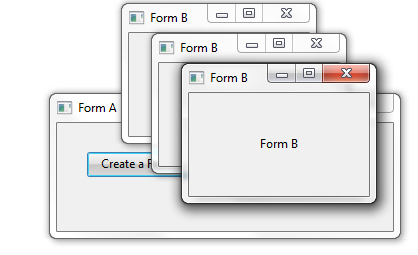
Form B 作成ボタンをクリックすると、Form Bの新しいインスタンスが作成され、コレクションに追加されます。その他の2つのボタンを使用してフォームを右または左に移動できます。
コレクションの定義
...
子フォームを保存するコレクションは、以下のように定義されます。
Define_Com Class(#Prim_
...
Kcol<#FormB #Std_Num>)
...
Name(#FormBs)
...
- コレクションは#FormBsという名前で、#FormBという名前のコンポーネントを収集
- キーは#Std_Num(パック数字(7,0))
コレクションへのアイテムの追加
新しいフォームBをコレクションに追加するコードは、Form B 作成ボタンのClickイベントに置かれます。
Change FieldB 作成ボタンのClickイベントに置かれます。
Change Field(#LISTCOUNT)
...
To('#FormBs.
...
ItemCount +
...
1')
...
Invoke Method(#FormBs<#listcount>.showform)
...
上の例では、以下のことに注意してください。
- コレクションのプロパティItemCountがコレクション内の次のスロットの取得に使用される
- フォームが作成され追加されるのは、初めて表示されるとき
コレクション・アイテムの操作
子フォームを右から移動する2つのボタンのClickイベントは、2つの異なる方法を使用してコレクション内のアイテムを操作します。
Move all Form Bs RightボタンのClickイベントは、コレクション内のすべてのフォームでForm BのMoveRightメソッドを呼び出します。 Invoke Method
Invoke Method(#formBs<>.MoveRight)
...
コレクション内のすべてのアイテムを操作するには、コレクションにブランクのキーを指定します。
#CollectionName<>
Move all Form Bs LeftボタンのClickイベントは、For/EndForを使用してコレクション内のすべてのアイテム間を移動し、左に移動します。 For Each
For Each(#Current)
...
In(#FormBs)
...
Change Field(#NEW_LEFT)
...
To('#Current.
...
Left -
...
5')
...
Set Com(#Current)
...
 Left(#New_Left)
     Endfor
また、以下も参照してください。
マルチ・フォーム・アプリケーション
コレクションの例3のソース・コード
Form A
...
     Function Options(*DIRECT)
     Begin_Com Role(*EXTENDS #PRIM_FORM) Caption('Form A') Clientheight(108) Clientwidth(336) Height(135) Layoutmanager(#GDLM_1)
...
Left(286)
...
Top(124)
...
Width(344)
...
* Using a Keyed Collection (PRIM_KCOL)
...
 to handle a multi-form application.
     * Define the keyed collection to be used to store the child forms.
     * The collection is named #FormBs and it collects #FormBs.
     * It is keyed by #Std_Num ie: a packed (7,0)
...
 number.
     Define_
...
Com Class(#Prim_
...
Kcol<#FormB #Std_Num>)
...
Name(#FormBs)
...
     * Define the form.
     * CreateFormBtn will create an instance of FormB
     * MoveRightBtn will move all the child FormBs to the right
     * MoveLeftBtn will move all the child FormBs to the left
     Define_Com Class(#PRIM_PHBN)
...
Name(#CreateFormBtn)
...
Caption('
...
Create a Form B')
...
Displayposition(1)
...
Left(30)
...
Parent(#COM_OWNER)
...
Tabposition(1)
...
Top(29)
...
 Width(109)
     Define_
...
Com Class(#PRIM_PHBN)
...
Name(#MoveRightBtn)
...
Caption('
...
Move all Form Bs Right')
...
Displayposition(2)
...
Left(139)
...
Parent(#COM_OWNER)
...
Tabposition(2)
...
Top(29)
...
 Width(166)
     Define_
...
Com Class(#PRIM_PHBN)
...
Name(#MoveLeftBtn)
...
Caption('
...
Move all Form Bs Left')
...
Displayposition(3)
...
Left(139)
...
Parent(#COM_OWNER)
...
Tabposition(3)
...
Top(54)
...
Width(166)
...
     * Grid layout manager to position the buttons
     Define_Com Class(#PRIM_GDLM)
...
 Name(#GDLM_1)
     Define_
...
Com Class(#PRIM_GDLI)
...
Name(#GDLI_1)
...
Manage(#CreateFormBtn)
...
 Parent(#GDLM_1)
     Define_
...
Com Class(#PRIM_GDLI)
...
Name(#GDLI_2)
...
Left(2)
...
Manage(#MoveRightBtn)
...
 Parent(#GDLM_1)
     Define_
...
Com Class(#PRIM_GDLI)
...
Name(#GDLI_4)
...
Left(2)
...
Manage(#MoveLeftBtn)
...
Parent(#GDLM_1)
...
Top(2)
...
     * Definition of child form (FormB)
     Define_
...
Com Class(#FORMB)
...
Name(#FORMB)
...
Componentversion(1)
...
     * Fields used to position the child forms (FormB)
     Define Field(#NEW_TOP)
...
Reffld(#STD_NUM)
...
Define Field(#NEW_LEFT)
...
Reffld(#STD_NUM)
...
Evtroutine Handling(#CreateFormBtn.Click)
...
     * Use the keyed collection property ItemCount to get the next slot in the collection
     Change Field(#LISTCOUNT)
...
To('#FormBs.
...
ItemCount + 1')
...
     * Show the form. When the form is shown, it is created and added to the collection
     Invoke Method(#FormBs<#listcount>.showform)
...
     * Adjust the form's position from the left and top
     Change Field(#NEW_LEFT)
...
To('#FORMBS<#listcount>.
...
Left + (#listcount * 30)')
...
Change Field(#NEW_TOP)
...
To('#FORMBS<#listcount>.
...
top + (#listcount * 30)')
...
Set Com(#formBs<#listcount>)
...
Left(#NEW_LEFT)
...
Top(#NEW_TOP)
...
     Endroutine
     Evtroutine Handling(#MoveRightBtn.Click)
...
     * Invoke the MoveRight method in FormB to move all forms in the collection to the right
     Invoke Method(#formBs<>.MoveRight)
...
     Endroutine
     Evtroutine Handling(#MoveLeftBtn.Click)
...
     * Use a For/EndFor loop to iterate through all the forms in the collection and to move them to the left
     For Each(#Current) In(#FormBs)
     Change Field(#NEW_LEFT)
...
To('#Current.
...
Left -
...
5')
...
Set Com(#Current)
...
 Left(#New_Left)
     Endfor
     Endroutine
     End_Com
...
Form B
...
     Function Options(*DIRECT)
     Begin_
...
Com Role(*
...
EXTENDS #PRIM_FORM)
...
Caption('
...
Form B')
...
Clientheight(103)
...
Clientwidth(180)
...
Formstyle(StayOnTopChild)
...
Height(130)
...
Layoutmanager(#ATLM_1)
...
Left(591)
...
Top(136)
...
Width(188)
...
     * Define the child FormB used by FormA
     * Define a label
     Define_Com Class(#PRIM_LABL)
...
Name(#LABL_1)
...
Alignment(Center)
...
Caption('
...
Form B ')
...
Displayposition(1)
...
Height(103)
...
Left(0)
...
Parent(#COM_OWNER)
...
Tabposition(1)
...
Tabstop(False)
...
Top(0)
...
Verticalalignment(Center)
...
Width(180)
...
     * Center the label on the form using an attachment layout
     Define_Com Class(#PRIM_ATLM)
...
 Name(#ATLM_1)
     Define_
...
Com Class(#PRIM_ATLI)
...
Name(#ATLI_1)
...
Attachment(Center)
...
Manage(#LABL_1)
...
Parent(#ATLM_1)
...
     * Define a field to position the form
     Define Field(#NEW_RIGHT)
...
Reffld(#STD_NUM)
...
     * Method to move the form to the right by incrementing the value of its Left property
     Mthroutine Name(MoveRight) Help('This method moves the form to the right.')
     Change Field(#NEW_RIGHT)
...
To('#COM_OWNER.
...
LEFT + 5')
     Set Com(#com_owner)
...
Left(#NEW_RIGHT)
...
     Endroutine
     End_Com
...
新しいフォームを作成し、祖先を指定すると、継承するフォームは祖先のフォームと完全に同じ外観と振る舞いを持ちます。
[ |../../index.htm#lansa/l4wdev06_1045.htm]