Page History
[  |../../index.htm#lansa/l4wdev06_1050.htm]
現在地:
...
コレクションを作成する方法は2つあります。1つはコレクション・スタイルFactoryを使用し、もう1つはコレクション・スタイルCollectionを使用します。
デフォルトでは、コレクションのStyleプロパティは、Factoryです。この場合、コレクションに存在しないキー・フィールドの値を使用してコレクションにアクセスされると、常にコレクションに新しいアイテムが作成されます。
もう1つの方法では、StyleをCollectionにできます。この場合、アプリケーションではSET_REFコマンドを使用して明示的にコレクションのアイテムを作成する必要があります。
参照を使用する利点は、明示的にコンポーネントを作成および破棄し、メモリの使用を直接制御できることです。アプリケーションが大きく複雑になるほど、アプリケーションでメモリを効率よく使用することが重要になってきます。
Factoryコレクション
コレクション内で定義されたオブジェクト#Objectの指定は、以下のようになります(デフォルトのStyle()が表示される)。
Define_Com Class(#Prim_KCol<#Object #Key>) Name(#Collection) Style(Factory)以下のようなコレクション内のアイテムの参照があります。 Set #Collection<#Key>
Set #Collection<#Key> ................
...
キーが#Keyであるオブジェクトがコレクション内に存在しない場合は、#Objectのインスタンスが自動的に作成されます。
Collectionスタイルのコレクション
コレクションが以下のように定義されているとします。
Define_Com Class(#Prim_KCol<#Object #Key>) Name(#Collection) Style(Collection)
次に
Set #Collection<#Key>
Set #Collection<#Key> ................
キーが#Keyであるオブジェクトがコレクション内に存在しない場合は、エラー・メッセージが表示されます。この場合にStyle(Collection)コレクションを正確に定義するには、以下のようにコーディングする必要があります。 If
If_
...
Ref #Collection<#Key> is(*null)
...
Set_Ref #Collection<#Key> To(*Create_
...
as #Object)Endif Set #Collection<#Key> ................
...
このコードは、最初に #Collection<#Key>がコレクション内に存在するかどうかをチェックします。存在しない場合、Set_Refコマンドで#Objectの新しいインスタンスが作成され、コレクション内に新しいオブジェクトの参照が割り当てられます。
これによりコードが増えるように見えますが、コレクションの中をチェックし、いつどのように追加するかを制御できるので、実際にはStyle(Collection)コレクションは非常に役に立ちます。
コレクションだけがStyle(Factory)プロパティとStyle(Collection)プロパティをサポートします。その他のタイプのコレクション(配列、リスト、ソート済配列など)は、暗黙的にStyle(Collection)コレクションになります。
FactoryおよびCollectionスタイルの例
この例では、FactoryスタイルのコレクションとCollectionスタイルのコレクションのコーディングの違いについて説明します。
factory buttonは、ボタンのプロパティが設定されると自動的に作成されます。
Set Com(#Button_Factory<#Use_Key>) Parent(#Com_Owner) Height(20) Width(100) Left(2) Top(#Next_Top) Caption('Factory Button')
collection buttonは、ボタンのプロパティの設定後、SET_REFコマンドを使用して明示的に作成されます。
Set_Ref Com(#Button_Collection<#Use_Key>) To(*create_as #Prim_Phbn)
...
Set Com(#Button_Collection<#Use_Key>)
...
Parent(#Com_Owner)
...
Height(20)
...
Width(100)
...
Left(2)
...
Top(#Next_Top)
...
Caption('
...
Collection Button')
...
どちらのスタイルのボタンのコレクションも、Realizeメソッドを使用して作成されます。
Invoke Method(#Button_Collection<>.Realize)
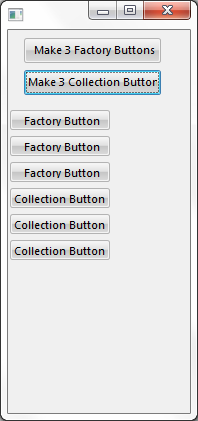
Factory/Collectionの例のソース
...
Function Options(*DIRECT)Begin_
...
Com Role(*
...
EXTENDS #PRIM_FORM)
...
Clientheight(383)
...
Clientwidth(182)
...
Height(410)
...
Left(452)
...
Top(63)
...
Visualstyle(#VS_NORM)
...
Width(190)
...
*
...
Style(Factory)
...
and Style(Collection)
...
collections* Define a Style(Factory)
...
keyed collection of buttonsDefine_
...
Com Class(#Prim_kCol<#Prim_
...
PHBN #Std_Num>)
...
Name(#Button_Factory)
...
*
...
Define a Style(Collection)
...
keyed collection of buttonsDefine_
...
Com Class(#Prim_kCol<#Prim_
...
PHBN #Std_Num>)
...
Name(#Button_Collection)
...
Style(Collection)
...
* Form layout is 2 buttons to initiate the creation of collection of buttonsDefine_Com Class(#PRIM_PHBN) Name(#PHBN_FACTORY) Caption('Make 3 Factory Buttons') Displayposition(2) Left(16) Parent(#COM_OWNER) Tabposition(1) Top(8) Width(137)Define_
...
Com Class(#PRIM_PHBN)
...
Name(#PHBN_COLLECTION)
...
Caption('
...
Make 3 Collection Buttons')
...
Displayposition(1)
...
Left(16)
...
Parent(#COM_OWNER)
...
Tabposition(2)
...
Top(40)
...
Width(137)
...
* Incrmental value used to position buttonsDefine Field(#NEXT_TOP)
...
Reffld(#STD_NUM)
...
Default(80)
...
Define Field(#USE_KEY)
...
Reffld(#STD_NUM)
...
* ----------------------------------------------------------------------* #PHBN_FACTORY :Create 3 more buttons in the Style(Factory) collection*
...
----------------------------------------------------------------------
...
Evtroutine Handling(#PHBN_FACTORY.Click)
...
Begin_
...
Loop To(3)
...
* Get the next key to be usedChange Field(#USE_KEY)
...
To('#Button_Factory.
...
ItemCount + 1')
...
* Create the button simply by referencing it.Since the item does* not exist in the collection and the collection is Style(Factory)
...
* then a new button will be automatically ""manufactured"
...
.....
...
Set Com(#Button_Factory<#Use_Key>)
...
Parent(#Com_Owner)
...
Height(20)
...
Width(100)
...
Left(2)
...
Top(#Next_Top)
...
Caption('
...
Factory Button')
...
* Increment the next top positionChange Field(#NEXT_TOP) To('#Next_Top + 26')End_Loop
...
* Now that the buttons have been created make them visible by realizing them
...
Invoke Method(#Button_Factory<>.Realize)
...
Endroutine
...
* ----------------------------------------------------------------------------* #PHBN_COLLECTION :Create 3 more buttons in the Style(Collection) collection*
...
-----------------------------------------------------------------------------
...
Evtroutine Handling(#PHBN_COLLECTION.Click)
...
Begin_Loop To(3)
...
Change Field(#USE_KEY)
...
To('#Button_Collection.
...
ItemCount + 1')
...
Set_Ref Com(#Button_Collection<#Use_Key>) To(*create_as #Prim_Phbn)
...
Set Com(#Button_Collection<#Use_Key>)
...
Parent(#Com_Owner)
...
Height(20)
...
Width(100)
...
Left(2)
...
Top(#Next_Top)
...
Caption('
...
Collection Button')
...
Change Field(#NEXT_TOP)
...
To('#Next_
...
Top + 26')
...
End_Loop
...
* Now that the buttons have been created make them visible by realizing them
...
Invoke Method(#Button_Collection<>.Realize)
...
Endroutine
...
End_Com
...